What’s in this guide
Digital artists need a mix of precise input devices, reliable accessories, and smart tooling to optimize workflow. This guide highlights five top picks that support drawing, outlining, shading, and note-taking—covering drawing tablets, gloves, and a digital notebook. The selections emphasize performance, comfort, and versatility for American creators across Mac, Windows, and mobile platforms.
| Product | Brand | Type | Key Benefit |
|---|---|---|---|
| HUION Inspiroy H1060P | HUION | Graphics Tablet | Large drawing area with battery-free pen and hot keys |
| HUION Inspiroy H640P | HUION | Graphics Tablet | Compact, portable, excellent pen pressure |
| BuTouch Professional 2 | BUTOUCH | Digital Painting Stylus | Battery-free, universal touchscreen compatibility |
| HUION Note | HUION | Digital Notebook | Digital handwriting with paper feel and audio notes |
| Digital Drawing Glove 2 Pack | WooKoudai | Glove Accessory | Reduces smudges and palm interference during drawing |
HUION Inspiroy H1060P Graphics Drawing Tablet

The HUION Inspiroy H1060P provides a generous 10 x 6.25-inch working area, suitable for wide canvases and detailed work. Its battery-free PW100 stylus supports tilt input up to ±60°, delivering a natural drawing feel with precise control. With 12 programmable shortcut keys and 16 soft keys, users can tailor shortcuts to their preferred apps and workflows, making common tasks quicker and more efficient.
Skillful Drawing Made Easy: H1060P Overview
Key advantages include a sturdy, professional-grade drawing surface and a driver that supports efficient shortcut customization. The slim profile and comfortable weight ensure extended sessions without fatigue, while the large active area accommodates complex compositions and multiple layers with ease.
HUION Inspiroy H640P Drawing Tablet

The H640P is a compact, portable drawing tablet designed for artists who want a lightweight solution without compromising capabilities. It features 8192 levels of pen pressure with a battery-free PW100 stylus, ensuring precise line control. Its six express keys plus driver-configurable shortcuts help streamline frequent actions, making it ideal for students and professionals working on the go.
Compact Power: H640P for Desktop and Travel
Its slim 0.3-inch profile and light weight make it ideal for tight workspaces, while the reliable pen performance ensures clean, precise strokes whether sketching, annotating, or coloring. This tablet is a practical choice for designers who value portability without sacrificing drawing quality.
BuTouch Professional 2 Digital Painting Stylus

The BuTouch Pro 2 stylus supports battery-free operation with broad touchscreen compatibility, enabling kids and adults to draw, take notes, or navigate devices across tablets and smartphones. Its ergonomic design and responsive tip provide a natural drawing experience, suitable for quick doodles, drafting, and on-screen writing without worrying about charging.
HUION Note 2-in-1 Digital Notebook

HUION Note blends traditional handwriting with digital efficiency. The application-driven system captures handwritten content as vector lines and transfers them to your device via the Huion Note app for iOS and Android. Audio recording adds a layer of detail to meeting notes or lectures, ensuring nothing is missed while preserving the tactile feel of pen on paper.
Digital Drawing Glove 2 Pack
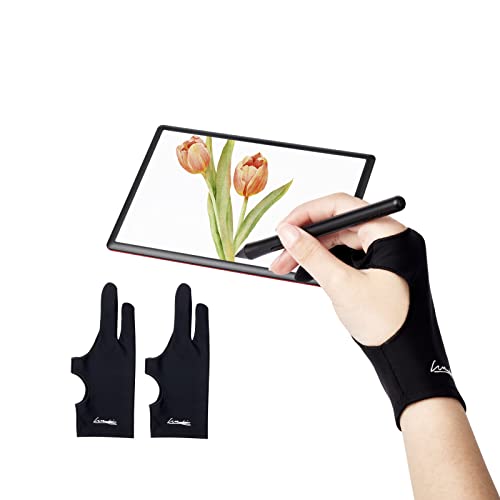
The drawing gloves reduce smudging and prevent unwanted palm contact with the tablet surface. The two-finger design offers flexibility for both right- and left-handed artists. Made from stretchy, breathable Lycra, these gloves stay comfortable during long sessions and help maintain clean input on touch screens.
Buying Guide
- Display vs. tablet input: If you primarily draw on a screen, invest in a high-precision graphics tablet (like HUION H1060P) or a responsive digital notebook (HUION Note) for a hybrid workflow that blends handwriting with digital output.
- Pen technology and feel: Battery-free, high-pressure sensitivity styluses with tilt support deliver natural line variation and control. Confirm compatibility with your computer or mobile device and driver software for shortcut customization.
- Size and portability: Larger tablets offer more space for detailed work, while compact models are ideal for travel and small desks. Consider your typical working environment when choosing size.
- Accessories that improve workflow: Glove protection reduces smudges, while a robust tool kit (like the YEETIN set) can support post-processing and maintenance. Note that some items may be more specialized than others.
- Cross-platform compatibility: If you use multiple devices or operating systems, verify that the device supports Mac, Windows, and Android as needed, plus any required apps or drivers for syncing work.
- Durability and customer support: Look for market-tested devices with reliable customer service, warranty coverage, and accessible replacement parts or accessories.
These selections provide diverse approaches to digital art creation—from drawing tablets that expand your canvas and enhance stylus precision, to a digital notebook that bridges handwritten notes with cloud-friendly storage, to ergonomic accessories that keep you comfortable during long sessions. The combination supports sketching, concepting, finalizing, and documenting creative workflows across devices.