What’s in this guide
- XP-PEN PA2 8192 Pressure Battery-Free Stylus
- Key Considerations
- XP-PEN PA6 Stylus For Artist 22/24
- Key Considerations
- XPPen Artist 15.6 Pro V2 Drawing Tablet
- Key Considerations
- PicassoTab X Drawing Tablet — 11″ Screen (X11)
- Key Considerations
- PicassoTab X Drawing Tablet PX11 — 11″ Standalone
- Buying Guide: Purchase Considerations For Stylus-Based Art Devices
Whether you’re sketching, inking, or coloring digitally, a responsive stylus is essential. This guide highlights five standout stylus-enabled drawing tablets and accessories that cater to artists of varying needs—from battery-free pens to high-pressure sensitivity, tilt support, and standalone tablets. Each entry includes core features to help you compare performance, compatibility, and value at a glance.
| Product | Key Benefit | Ideal For |
|---|---|---|
| XP-Pen PA2 Stylus | 8192 pressure levels, battery-free operation, 60° tilt | Artists who want long, uninterrupted drawing without charging breaks |
| XP-Pen PA6 Stylus | 8192 pressure levels, tilt support, battery-free | Professional illustration on Artist 22/24 with precise control |
| XPPen Artist 15.6 Pro V2 | 16K pressure levels, red dial controls, full-laminate display | Detail-focused work on a PC or Mac with a tactile workflow |
| PicassoTab X Drawing Tablet (11″ Screen) – X11 | Standalone, pre-installed apps, learning tutorials | Beginners wanting an all-in-one learning and creating device |
| PicassoTab X Drawing Tablet (PX11, 11″ Screen) | Portable, bundled software, beginner-friendly tutorials | Travel-friendly, entry-level digital artists |
XP-PEN PA2 8192 Pressure Battery-Free Stylus

The XP-Pen PA2 is a battery-free stylus designed for artists using compatible XP-Pen tablets. It does not require charging, enabling extended drawing sessions. It supports up to 8,192 levels of pressure for nuanced lines and shading. An integrated tilt function up to 60 degrees helps achieve natural brush dynamics and smoother transitions between strokes.
Key Considerations
- Compatibility: Works with specific XP-Pen tablets; verify model support before purchase.
- Battery-free design: No charging interruptions during sessions.
- Pressure and tilt: Fine control for line weight and shading variations.
XP-PEN PA6 Stylus For Artist 22/24

The PA6 stylus is battery-free and tailored for the Artist 22 2nd Generation and Artist24 tablets. It provides 8,192 levels of pressure for precise control and a 60-degree tilt function for natural shading. This pen is crafted for long drawing sessions without interruptions, making it suitable for professional digital artists who demand reliability.
Key Considerations
- Compatibility must match specific Artist 22 or Artist24 models.
- High pressure sensitivity enables detailed line work.
- Tilt shading capability aids realistic shading without software tweaks.
XPPen Artist 15.6 Pro V2 Drawing Tablet

The XPPen Artist 15.6 Pro V2 is a versatile drawing tablet featuring a 16K pressure-sensitive X3 Pro smart chip stylus with robust accuracy. It delivers up to 16,384 levels of pressure, providing ultra-fine control for detailed lines and shading. A Red Dial allows for quick brush size, zoom, and navigation adjustments, streamlining workflow. The device emphasizes comfort with a natural hand position during long sessions.
Key Considerations
- High resolution stylus for intricate art and fine lines.
- All-in-one Red Dial control enhances efficiency.
- Requires computer connection; ensure your system meets compatibility needs.
PicassoTab X Drawing Tablet — 11″ Screen (X11)
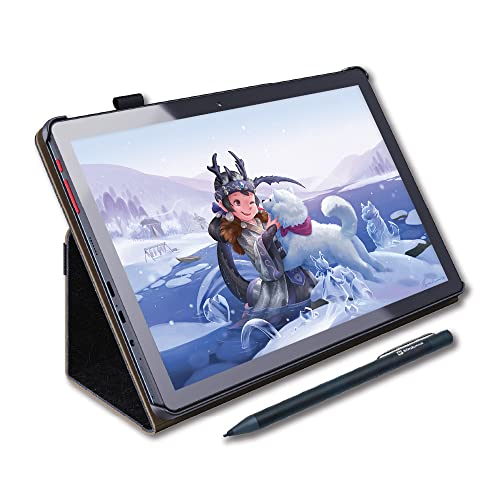
The PicassoTab X11 provides a complete learning package for beginners. It includes a precision stylus and access to drawing and animation apps, plus three bonus items for added value. The 11-inch Full HD, laminated screen delivers a paper-like drawing feel with anti-glare properties, enabling accurate strokes and comfortable long sessions. The bundle emphasizes education alongside creative exploration, with pre-installed tutorials.
Key Considerations
- Standalone operation with built-in apps and tutorials.
- Compact 11″ display suitable for travel and classroom use.
- Accessible learning resources coupled with creative tools.
PicassoTab X Drawing Tablet PX11 — 11″ Standalone

The PX11 version mirrors the X11’s standalone approach with an 11-inch screen and bundled drawing apps. It emphasizes portability and beginner-friendly software, including Artixo tutorials to guide new artists through fundamentals. The device aims to empower learners with accessible tools and a compact footprint for on-the-go art creation.
Buying Guide: Purchase Considerations For Stylus-Based Art Devices
- Pressure sensitivity and tilt: Higher levels provide finer control for inking, shading, and brush dynamics. Tilt support enables natural shading without constant software adjustments.
- Power source: Battery-free styluses reduce downtime and maintenance. Check compatibility to ensure the pen works with your tablet model.
- Display and resolution: For tablets with screens, higher resolution and color accuracy (sRGB coverage) improve fidelity of lines and color work. Laminated displays provide a closer pen-to-paper feel.
- Standalone vs. computer-connected: Standalone tablets are portable and beginner-friendly, while PC/Mac-based tablets often offer broader software compatibility and powerful performance for professionals.
- Controls and workflow: Features like a dial, express keys, or shortcut buttons can streamline common tasks such as brush size changes and navigation.
- Learning resources: For beginners, built-in tutorials and pre-installed apps can accelerate skill development and consistency in practice.
- Compatibility and ecosystem: Ensure the stylus and tablet are compatible with your preferred software (e.g., Photoshop, Krita, Clip Studio) and operating system.
- Portability and battery life: For travel or field work, consider device weight, battery life (for any non-battery-free stylus), and overall size.
When choosing, align the device with your typical workflow: do you prefer standalone tablets with learning apps, or do you rely on a powerful computer-based setup with precise stylus input? By weighing pressure sensitivity, tilt capability, display quality, and portability, you can select a stylus-centric solution that matches your artistry and pace.