What’s in this guide
Creating custom t-shirts at home requires equipment that delivers bold colors, durable transfers, and reliable operation. This guide highlights five printers and heat-press setups well-suited for t-shirt projects, spanning auto heat presses for quick batches and printer models that handle sublimation transfers. Each pick balances ease of use, print quality, and value to help you choose the right setup for your designing ambitions.
Summary of chosen products
| Product | Brand | Type | Key Benefit |
|---|---|---|---|
| HTVRONT Auto Heat Press Machine | HTVRONT | Auto 15×15 Heat Press | Hands-free transfers with auto-press and auto-release |
| WHUBEFY 5 in 1 Heat Press | Whubefy | 5-in-1 Heat Press | Versatile attachments for shirts, hats, mugs, and plates |
| Topdeep Pro 15×15 Swing-Away Heat Press | Topdeep | 5-in-1 Heat Press | Swing-away design and multiple attachment options |
| Brother Sublimation Printer | Brother | Sublimation Printer | Artspira compatibility and ready-made design integration |
| Canon MegaTank G3270 | Canon | Wireless Inkjet Printer | High page yield and wireless printing for transfers and designs |
HTVRONT Auto Heat Press Machine for T Shirts
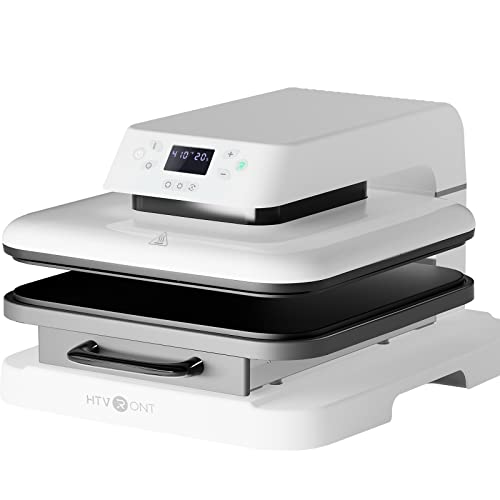
The HTVRONT Auto Heat Press Machine is designed to simplify heat transfers for t-shirt projects. It features an auto-press function that lowers the platen and then auto-releases when the transfer is finished, reducing hands-on time and the risk of scorching. With a 15×15 inch heating plate, it can handle standard t-shirt designs and multiple layers. The unit heats to 320°F (160°C) quickly and maintains temperature, offering steady performance for consistent results. Multiple practical modes support versatile transfer tasks, making it suitable for beginners and intermediate crafters aiming for faster production.
Key features include auto-press operation, rapid heat-up, and a sensible balance between speed and control. The design focuses on reliability during repeated presses, which is helpful for small businesses or hobbyists producing batches of shirts. The HTVRONT machine pairs well with standard heat transfer paper, sublimation sheets, and basic vinyl projects, though users should verify compatible materials for high-temperature substrates.
WHUBEFY Five-In-One Heat Press

WHUBEFY’s 5-in-1 heat press provides an all-in-one solution for various heat-transfer projects. It includes attachments for hats, mugs, and plates, expanding beyond standard t-shirt transfers. The 360-degree rotation ensures even pressure across curved surfaces while maintaining operator safety. The digital LCD control panel allows precise temperature and timer settings, typically within a 200-450°F range. This versatility makes it suitable for sublimation, vinyl, and other heat-applied designs across textiles and small decor items.
The WHUBEFY unit emphasizes consistent heat distribution and adjustable settings to accommodate different materials and transfer methods. For crafters exploring multi-item production (shirts plus mugs or caps), this model offers an efficient workflow in a compact home setup. Always ensure you select the correct platen and mat for the intended project to maximize transfer quality and avoid scorching or misalignment.
Topdeep Pro 15×15 Inch Heat Press

The Topdeep Pro 15×15 heat press is built to handle detailed t-shirt designs with a swing-away mechanism for safe operation and consistent pressure. It includes multiple interchangeable platens and solid construction to support repeated use, which is beneficial for hobbyists and small-business makers. The machine’s temperature range supports typical sublimation and vinyl transfer processes, with an emphasis on uniform heating and even pressure. Its robust frame and adjustable pressure settings help manage various fabric weights and transfer types, from light cottons to heavier blends.
Users evaluate operation speed and reliability, noting that the double-tube heating system helps sustain even temperatures during longer sessions. The Topdeep model can be a strong fit for crafters who want a single, versatile press capable of handling shirts, hats, and plates, while offering a straightforward user interface for repeatable results.
Brother Sublimation Printer

The Brother Sublimation Printer is designed to support sublimation workflows through app-based design access and ready-made patterns. It integrates with Artspira for easy image import, design adaptation, and a growing catalog of sublimation-ready patterns. This model emphasizes seamless transfer from digital design to print, enabling quick iterations for custom apparel. It can be paired with a compatible heat press to complete the transfer process. The printer is marketed toward creators who want to exploit digital design ecosystems and simple print-to-transfer pipelines for apparel and accessories.
Considerations for choosing this option include compatibility with Artspira and the availability of sublimation-compatible inks and substrates. While the Brother Sublimation Printer offers a streamlined path from design to garment, users should verify the availability of replacement inks, heat press compatibility, and any firmware updates that affect sublimation performance and color management.
Canon MegaTank G3270 All-in-One Wireless Inkjet Printer

The Canon MegaTank G3270 is an all-in-one wireless inkjet printer with a high-capacity ink system designed to reduce running costs and support regular printing for sublimation-ready designs when used with compatible sublimation inks. Its wireless connectivity and bundled ink supply simplify setup for home studios. While primarily a standard printing device, it can serve as a backbone for transferring digital designs to transfer papers or sublimation substrates, especially for users who value low-cost inks and easy network access for sharing designs. It’s suitable for hobbyists seeking a versatile, space-efficient solution that can handle documents and photos, as well as garment-ready graphics with the right substrates.
Buying Guide
- Purpose and workflow: Decide whether your priority is a dedicated heat press with multiple attachments for production or a sublimation printer that can directly print designs onto transfer sheets. If you plan to produce large batches, a 15×15 inch heat press with auto-release can save time and improve consistency.
- Transfer type: Sublimation requires compatible inks and transfer materials. Verify that your printer supports sublimation inks and compatible substrates (polyester fabrics or sublimation-coated items). For vinyl or screen-print transfers, a heat press with precise temperature and pressure control is essential.
- Ease of use: Auto-press features and digital temperature/time controls reduce manual workload and help maintain consistent results across batches. Look for models with clear controls and reliable safety features like auto shutoffs or cool-touch exteriors.
- Attachments and versatility: 5-in-1 presses broaden project options but may require more setup. Ensure you have the right platen sizes and accessory kits for t-shirts, hats, mugs, and plates if you plan diverse products.
- Cost of consumables: Cartridge-free or high-yield ink systems can significantly lower operating expenses. Compare ink bottle costs, print yield, and availability of replacement parts in your chosen ecosystem.
- Space and maintenance: Larger presses demand more space and stable mounting. Regular cleaning, platen conditioning, and calibration help preserve transfer quality over time.
- Software and design ecosystem: Substantial value comes from compatible apps that simplify design import, editing, and batch processing. Consider whether your chosen printer or press integrates with your preferred design tools or marketplaces.
- Safety and suitability: Ensure devices have appropriate safety features and are suitable for home environments (noise levels, heat management, and ventilation). For beginners, starting with a straightforward setup can minimize risk while learning transfer techniques.