What’s in this guide
Selecting a beginner-friendly laser engraving machine means balancing power, safety, ease of use, and the range of materials you can work with. The following picks are popular for newcomers and hobbyists in the United States, offering accessible setup, reliable performance, and supportive software ecosystems. This guide highlights five models that help you turn ideas into precise, professional-looking engravings without a steep learning curve.
| Brand | Model | Laser Power | Work Area | |
|---|---|---|---|---|
| Carverall | K15 Pro | 5W | 200×300 mm | Ultra-precise, cross-material versatility |
| Longer | Ray5 | 5W | 400×400 mm | High-speed engraving with 0.01 mm accuracy |
| ACMER | S1 | 3.5W | 5.1×5.1 in | Compact, portable for home use |
| WAINLUXPRO | K10 | 5W | Portable enclosure design | Offline operation and memory mode |
| CREALITY FALCON | Falcon 10W | 10W | Varies with rotary kit | High-precision, suitable for cylindrical objects |
Carverall K15 Pro 5W: Precision For Beginners
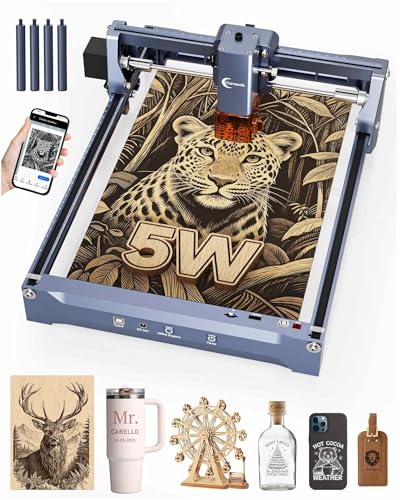
The Carverall K15 Pro is designed for first-time laser users who want professional results without complexity. It offers true 5W output and a generous 200×300 mm work area, enabling fine detailing on wood, coated metal, acrylic, and leather. An ultra-precise 0.01 mm engraving capability and a high-speed drive (up to 15,000 mm/min) help produce intricate jewelry, gifts, and décor with minimal fuss. The device ships with safety glasses, test materials, and essential tools, and is easy to assemble with six screws, avoiding belt-oriented setups.
A key advantage is compatibility. The K15 Pro supports popular software options like LightBurn and LaserGRBL and pairs with a flexible CutLabX app across Windows, Mac, Android, and iOS. This makes it approachable for beginners while still offering room to grow into more demanding projects as skills improve.
What to consider: With 5W of power, it handles many common materials well but may require careful material selection and focusing for very dense substrates. The zero-fee ecosystem and broad OS compatibility reduce barriers for new users and students exploring laser engraving as a hobby or potential craft business.
Longer Ray5 5W: Speed And Precision

The Ray5 from Longer combines a 5W laser with a 400×400 mm workspace, offering substantial real estate for plaques, signs, and larger craft projects. It shines in speed, delivering engraving up to 10,000 mm/min thanks to a capable ESP32-based architecture that supports robust processing power while maintaining energy efficiency. The laser spot measures 0.08×0.08 mm, and documented engraving accuracy reaches 0.01 mm for precise patterns and detailed textures on wood, acrylic, leather, and glass.
Versatility remains a focus with a 400×400 mm working area, making it suitable for mid-sized projects. Software compatibility is strong, with integration options including LightBurn and LaserGRBL, helping newcomers transition from simple designs to more complex compositions. The Ray5 also emphasizes reliability and consistent results with a clear emphasis on beginner-friendly setup and offline capabilities.
ACMER S1: Compact Starter Laser

The ACMER S1 is a compact, beginner-friendly laser engraver with a 3,500 mW output and a 5.1×5.1-inch engraving area. It specializes in delivering fine detail at speeds up to 10,000 mm/min and can engrave over 100 materials, including wood, acrylic, leather, and plastic. The device emphasizes portability and ease of use, pairing with professional software like LightBurn and LaserGRBL for a broader creative palette. Its small footprint makes it ideal for desks, apartments, or classrooms where space is at a premium.
Note the safety emphasis integrated into its design, and the relatively modest work area means larger pieces may require planning or multiple passes. Nevertheless, laser performance and ease of operation position the S1 as a strong entry point for beginners seeking quality results without overwhelming setup steps.
CREALITY FALCON 10W: High-Power Beginner Tool

The Creality Falcon 10W balances power and usability for beginners who anticipate more demanding tasks. With 10W of laser power and a 72W system on some configurations, it can cut deeper and engrave rapidly on wood, metal, and acrylic, making it suitable for signs, tumblers, and cylindrical objects when used with the included rotary kit. Safety features include an anti-UV filter acrylic module, emergency stop, and an active stop function to guard against tilt and other hazards during operation.
Setup is designed to be approachable in about 10–20 minutes, and the Falcon supports a broad range of materials, including some metals when used with appropriate parameters. The 4-in-1 Rotary Kit expands project possibilities and helps beginners explore engraving on varied shapes, from tumblers to vases, while maintaining user safety and control.
Buying Guide: Key Purchase Considerations For Beginners
- Power and material compatibility: Start with a machine in the 3.5–5W class for beginners to work common materials like wood, acrylic, and leather. Higher power models (7–10W) enable engraving on harder materials and deeper cuts but require careful safety handling and ventilation.
- Safety features: Look for class safety design, enclosed housings, eye protection, automatic shutoff on lid opening, and emergency stops. A well-sealed system reduces exposure and makes it easier to learn responsibly.
- Work area and expansion: A larger working area accommodates bigger projects. Consider models with expandable rotary attachments for cylindrical objects, which broaden project scope without upgrading hardware.
- Software and ecosystem: Compatibility with beginner-friendly software like LightBurn or LaserGRBL helps you learn quickly. Offlining capabilities and memory presets let you work without constant computer control.
- Setup time and maintenance: Prefabricated assemblies with simple screw-based setup save time. Maintenance-friendly designs with clear instructions help beginners maintain performance over time.
- Noise, ventilation, and dust control: Desktop lasers generate noise and fumes; ensure you have adequate ventilation or use in well-ventilated spaces. Dust management and protective enclosures improve the learning environment.
- Community and support: Brands with active user communities and accessible customer support make troubleshooting and learning faster, especially for first-time users.
- Future-proofing: If you anticipate expanding to more complex projects, a model with a larger work area, higher power, and compatible accessories (like rotary kits) provides growth without a full upgrade.
Additional Considerations: How To Choose For Your Projects
- Beginner projects: Choose a device that excels at engraving fine details on wood, leather, and acrylic. A balanced mid-range size helps you learn without committing to oversized materials right away.
- Creative goals: If you want to produce gifts, signs, or jewelry prototypes, prioritize high engraving accuracy (0.01 mm or better) and reliable software support to iterate quickly.
- Space and budget: Compact, all-in-one units suit apartments and classrooms. If budget allows, invest in a system with a robust safety system and an accessible spare-parts ecosystem for longer-term use.
Educational and hobbyist users should weigh how each model aligns with their immediate needs and long-term aspirations. The five selections highlighted offer a spectrum of power, size, and feature sets designed to help beginners grow with confidence while producing high-quality results in common craft materials.