What’s in this guide
Choosing the right laser cutter for acrylic projects combines power, precision, and ease of use. This guide highlights five reliable options that perform well with acrylic, whether you’re engraving detailed designs or cutting clear acrylic sheets. Each product section includes key specs and practical considerations to help you compare capabilities, safety features, and setup requirements.
| Product | Brand | Approximate Power | Working Area | |
|---|---|---|---|---|
| LONGER Ray5 5W | Longer | 5W | 400×400 mm | High-speed, 0.08 mm spot |
| LONGER Ray5 3.5W | Longer | 3.5W | 130×140 mm | Portable, fast engraving |
| xTool P2S | xTool | 55W CO2 | Large bed (26″×14″) | Smart cameras, high precision |
| CREALITY FALCON 10W | CREALITY FALCON | 10W | Not specified (desktop setup) | Air assist, rotary kit |
| Carverall K15 Pro 5W | Carverall | 5W | 200×300 mm | Real 5W output, easy setup |
Note: Availability and specifications can change. Always verify current details before purchasing to ensure the cutter’s capabilities align with your acrylic projects.
LONGER Ray5 5W Laser Engraver — High Precision, 400x400mm

The Longer Ray5 5W Laser Engraver features a 0.08×0.08 mm laser point and 0.01 mm engraving accuracy, enabling fine detail on acrylic surfaces. Its 400×400 mm working area accommodates mid-sized projects, while a 240 MHz ESP32-based controller supports rapid processing and efficient energy use. The device is marketed with offline capabilities, a 3.5″ touch screen, and a 10,000 mm/min engraving speed, making it suitable for precise acrylic patterns and small signage.
LONGER Ray5 3.5W Laser Engraver — Compact Yet Precise

This 3.5W variant emphasizes portability with a compact footprint while delivering dependable engraving for acrylic. Its 0.04×0.04 mm spot size supports detailed designs, and the 130×140 mm working area fits small to medium acrylic pieces. The unit is described as fully assembled with a focus block for straightforward setup, making it convenient for hobbyists and professionals who want quick results on acrylic substrates.
xTool P2S 55W CO2 Laser Cutter — High Throughput

The xTool P2S uses a 55W CO2 laser with enhanced airflow, dual 16 MP cameras for real-time previews, and LiDAR-based autofocus. It supports a large bed (26″×14″), auto-passthrough for long materials, and a 3D curved engraving feature. For acrylic, this model offers strong cutting and engraving performance on clear acrylic sheets and other materials, plus compatibility with popular software ecosystems for workflow efficiency.
CREALITY FALCON 10W Laser Engraver — Air Assist

The Creality Falcon 10W offers a higher power option with air assist, enabling cleaner cuts through thicker acrylic and faster engraving. It includes a 72W high-precision system and a 4-in-1 laser rotary roller kit for cylindrical objects. Safety features such as an anti-UV filter, emergency stop, and accessible setup are highlighted, making it suitable for more demanding acrylic projects and educational use.
Carverall K15 Pro 5W — Beginner-Friendly
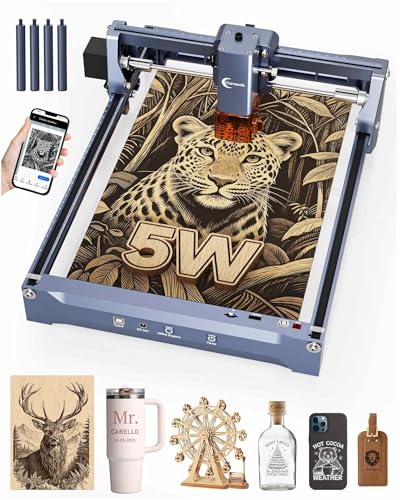
The Carverall K15 Pro delivers a true 5W output with a 0.01 mm engraving precision and a compact 200×300 mm workspace. It’s designed for quick setup, with a focus on ease of use and compatibility with popular software tools such as CutLabX, LightBurn, and LaserGRBL. This model suits hobbyists and small studios aiming to engrave or cut acrylic at moderate sizes with reliable accuracy.
Buying Guide
- Power and material thickness: Higher wattage (e.g., 10W CO2 or 5W diodes) increases capability to cut thicker acrylic and speed up engraving. Consider your typical sheet thickness and project size.
- Engraving accuracy and spot size: Smaller laser spots yield finer details. Look for stated spot size (e.g., 0.04 mm, 0.08 mm) and reported engraving tolerances (often around 0.01 mm).
- Working area and footprint: Match the bed size to your common project dimensions. Large beds enable bigger signs or panels, while compact units save space for hobby setups.
- Air assist and cooling: Air assist improves cutting efficiency on acrylic and reduces burn marks. Adequate cooling is essential for sustained performance.
- Software compatibility: Ensure compatibility with your preferred software (LightBurn, LaserGRBL, CutLabX) and whether the machine supports offline operation or needs a constant PC connection.
- Safety features: Look for emergency stop, UV shielding, enclosure with proper ventilation, and certified safety classes to protect eyes and skin during operation.
- Setup and user-friendliness: Some models ship assembled or with quick-install kits, which reduces setup time. Consider whether you need rotary accessories for cylindrical acrylic items.
- Maintenance and support: Check for readily available spare parts, customer support quality, and the availability of consumables like lenses, air hoses, and replacements.
- Price-to-performance balance: For acrylic, balance power, bed size, and feature set against price. Mid-range machines often provide the best value for hobbyists and small shops.
- Safety and compliance: Ensure the machine adheres to local regulations and includes essential safety documentation and protective measures for home environments.