What’s in this guide
Finding the right laser or engraving tool as a beginner can be overwhelming. The best engravers for newcomers prioritize safety, ease of use, solid software support, and reliable results across common materials like wood, acrylic, leather, and metal. This article highlights five beginner-friendly options with strong feature sets, from compact diode machines to more capable CO2-style performers, helping you choose a model that fits your projects, space, and budget. Explore quick-start capabilities, clarity of guidance, and potential expansion as you grow your skills.
| Product | Key Strength | Material Range |
|---|---|---|
| WECREAT Vista 10W | TopView camera, auto-focus, rotary compatibility | Wood, leather, glass, metal, jewelry |
| xTool S1 | 40W power, large bed, AutoPassthrough, AI assistance | Wood, metal, acrylic, leather |
| Creality Falcon A1 | Air assist, HD camera positioning, accessibility | Wood, metal, glass, PU |
| ACMER S1 | Compact mini with 3,500 mW, LightBurn compatibility | Wood, acrylic, leather, paper |
| ATOMSTACK P1 | Portable, free software, precise 0.1mm accuracy | Wood, leather, cardboard, stone |
WECREAT Vista 10W Laser Engraver

The WECREAT Vista 10W offers a compact design with a 16.34″ x 11.42″ work area and a 0.06 x 0.04 mm laser spot, enabling precise work on thin materials like fabric and acrylic. A 600 mm/s engraving speed supports efficient practice sessions, while an optional 2W infrared module expands capability to detailed work on metal and plastics. The device emphasizes safety with class 1 laser compliance and features a TopView camera for accurate alignment and distortion-free results, reducing material waste for beginners. A 90° FlipLaser rotary attachment expands the range to tumblers and mugs without complicated calibration.
Key features:
- Class 1 laser system with 10W nominal output
- TopView precision camera for alignment and autofocus
- Rotary attachment via FlipLaser for cylindrical objects
- Large but compact work area suited for DIY projects
ACMER S1 Laser Engraver

The ACMER S1 is a compact beginner-friendly laser engraver with a 3500 mW output and a 5.1 x 5.1 inch engraving area. It supports 1:1 photo-realistic engravings and offers a reliable balance of power and precision for woods, acrylics, and leather, with recommended parameters for common materials. The device emphasizes portability and compatibility with LightBurn and LaserGRBL, making it accessible for learners who want straightforward software integration while maintaining a small footprint for homes or classrooms.
Key features:
- 3500 mW laser power with 0.04 x 0.04 mm spot
- Compact size with practical engraving area
- Software compatibility for easy setup
Carverall K15 Pro 5W Laser Engraver
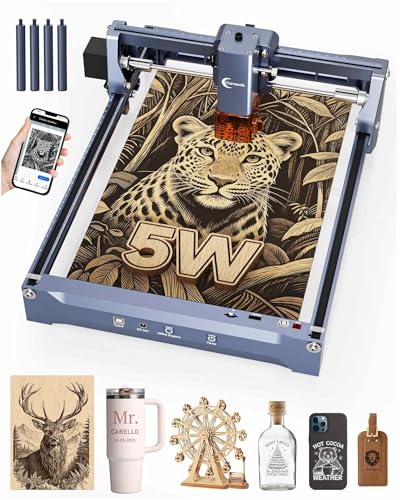
The Carverall K15 Pro delivers a true 5W output and a 0.01 mm ultra-precision capability with a fast engraving rate. It targets beginners who want reliability across a variety of materials, including wood, coated metals, and acrylics, with a 200 x 305 mm bed that accommodates mid-sized projects. The kit includes safety and setup essentials, and it is designed for quick assembly with no belts, supporting easy growth from simple projects to more complex designs as skills advance.
Key features:
- Real 5W power with high-precision performance
- Mid-sized work area suitable for personalized gifts
- Easy setup with compatibility for common software
xTool S1 40W Laser Engraver and Cutter

The xTool S1 stands out with a powerful 40W laser, AutoPassthrough, and a generous bed size of 23.93″ x 15.16″. This model is built for larger projects, such as signs or batch engraving, while still offering beginner-friendly features like auto-focus, user-friendly software (XCS), and a broad material range. It supports 3D engravings on curved surfaces and provides extensive tutorials and pre-tested material parameters to simplify initial learning and experimentation.
Key features:
- 40W laser power with auto-focus
- Large bed and auto-passthrough for big jobs
- Intuitive software and design resources for beginners
Creality Falcon A1 10W Laser Engraver

The Falcon A1 from SainSmart (Creality) delivers 10W of laser power in a robust package with air assist and an HD camera positioning system. It emphasizes accurate alignment, material recognition, and a sizable 381 x 305 mm workspace, which helps beginners tackle larger projects without sacrificing precision. The dual-access design and clear panels improve workflow visibility, while material presets streamline material selection, reducing setup time for new users.
Key features:
- 10W laser power with precise 0.06 x 0.08 mm spot
- Large engraving area and air assist for cleaner cuts
- HD camera and material presets for easier setup
KENTOKTOOL LE400PRO 50W Laser Engraving Machine

The KENTOKTOOL LE400PRO is a higher-power option designed for beginners who plan to scale up. With a 50W capability and a fixed-focus 0.08 mm spot, it balances precision and depth for materials like stainless steel or ceramics, though the focus is on a robust, all-metal build. It features easy tool-free focus adjustment, a straightforward installation, and a rapid 6000 mm/min engraving speed. It is suitable for those looking to push beyond beginner projects into more demanding outcomes.
Key features:
- Ultra-fine focus and robust construction
- High-speed engraving with simple focus adjustments
- Versatile material compatibility for ambitious projects
Buying Guide: Key Considerations For Beginners
Choosing the right engraver involves balancing safety, usability, and capability. Here are essential considerations to guide your decision:
- Power vs. safety: For beginners, lower-wiber options (3.5W–10W) emphasize safety and ease, while higher-power units unlock deeper cuts but require careful handling and ventilation.
- Bed size and accessibility: A larger bed enables bigger projects, but ensure the machine fits your workspace. Consider models with accessible doors and clear panels for convenient material loading.
- Software compatibility: Look for tools with widely supported software (LightBurn, LaserGRBL, or proprietary suites) and strong online tutorials to accelerate learning.
- Focus and alignment: Auto-focus and integrated cameras simplify setup, reduce waste, and improve first-time success rates for beginners.
- Material range: If your goals include wood, acrylic, leather, and metal, prioritize machines with proven performance across these materials and available parameter guides.
- Safety features: Enclosures, lid safety, automatic shutoff, and Class 1 laser compliance help minimize risk while learning.
- Upgrade path and support: Consider products with readily available spare parts, rotaries, or upgrade options as your projects grow.
- Community and resources: Access to tutorials, project libraries, and user forums can shorten the learning curve and inspire ideas.
Overall, beginners should look for a balance of intuitive operation, helpful guidance, and room to grow. If you plan to do a mix of signs, gifts, and personalized items, a model with a larger bed, a capable camera system, and strong software support will serve you best. For compact spaces or classroom use, prioritize safety features, straightforward setup, and abundant learning resources. Each option above offers a different blend of these attributes to match varying beginner needs.