What’s in this guide
Finding the right drawing tablet for kids combines safety, durability, and engaging features. The following selections focus on screen-friendly, mess-free options that inspire creativity while supporting early learning. Each choice is suitable for ages 3 and up, offers eye-friendly LCD technology, and emphasizes portability or educational value. Use this guide to compare sizes, durability, and ease of use across popular kid-focused drawing tablets.
| Product | Brand | Key Features |
|---|---|---|
| KTEBO 2 Pack 10 Inch LCD Writing Tablet | KTEBO | Two tablets, lightweight, pressure-sensitive screen, no radiation, portable |
| 4 Pack LCD Writing Tablet 8.5 Inch | TQU | Four colors, erase button, front lock switch, durable and simple to use |
| PicassoTab X Drawing Tablet | Simbans | Standalone tablet with drawing apps, bonus items, portable 10″ screen |
| Crayola Ultimate Light Board | Crayola | LED illumination, tracing panel, durable, multiple light effects |
| Kinayue 16 Inch LCD Writing Tablet | Kinayue | Large screen, rechargeable battery, eye-protecting display |
KTEBO 2 Pack 10 Inch LCD Writing Tablet

The KTEBO two-pack includes a pink and a blue 10-inch LCD writing tablet, ensuring a ready-to-use drawing surface for kids. The ultra-thin 0.27-inch design keeps the boards highly portable and easy to carry in bags or backpacks. The screens are pressure-sensitive and designed to be easy on the eyes with no radiation, glare, or blue light—supporting extended doodling, counting, and spelling practice without mess.
4 Pack LCD Writing Tablet 8.5 Inch

This 4-pack from TQU provides four color options—Blue, Light Blue, Green, and Pink—so siblings or friends can doodle side by side. The tablet uses flexible liquid crystal technology for brighter, crisper lines and offers an erase button and a front lock switch to save important notes or drawings. Its 8.5-inch display strikes a balance between portability and drawing area, making it suitable for travel and classroom use.
PicassoTab X Drawing Tablet
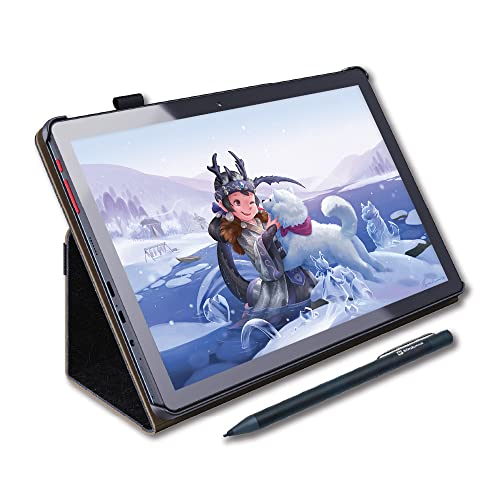
The PicassoTab X is a 10-inch standalone drawing tablet that includes pre-installed drawing and animation apps, enabling immediate creativity without a computer. It ships with bonus items like a tablet case, drawing glove, power adaptor, and screen protector, providing a complete drawing setup. Its substantial processing power and large screen support more ambitious artwork, while keeping it approachable for beginners and young artists alike.
Crayola Ultimate Light Board

The Crayola Ultimate Light Board offers an illuminated drawing surface with three light modes and a removable tracing panel. It comes with mini gel markers and a built-in kickstand, transforming the experience into a projector-like activity that encourages tracing and precise line work. The light-up feature helps young artists see their lines clearly, adding a new dimension to creative exploration.
Kinayue 16 Inch LCD Writing Tablet

The Kinayue 16-inch LCD doodle board provides a roomy canvas for bigger drawings, making it ideal for collaborative projects, classrooms, or family doodling sessions. It uses a rechargeable battery design with USB charging, reducing disposable battery waste. The eye-protective, back-lit LCD screen delivers bright colors and smooth lines, supporting writing, drawing, tracing, and even basic math or letter practice on the go.
Buying Guide: Key Considerations For Choosing A Kid-Friendly Drawing Tablet
- Screen size and portability: Smaller boards are easier for young children to handle, while larger screens support more complex artwork and collaborative use. Consider travel needs and the child’s age when selecting size.
- Eye protection and screen technology: LCD writing tablets with anti-glare, no-radiation screens reduce eye strain during extended drawing sessions. Look for pressure-sensitive surfaces for varied line thickness.
- Durability and materials: Child-focused devices should withstand drops and rough handling. Look for sturdy plastics, secure stylus holders, and rounded edges to minimize injury risk.
- Power source and battery life: Rechargeable models save on waste and ongoing costs. If batteries are used, check for easy replacement and safety features (e.g., screw-secured battery compartments).
- Erasing and saving features: Erase buttons allow quick resets; lock or save features help preserve important drawings. For classroom or group use, multiple units with independent erase controls are beneficial.
- Educational value: Some tablets come with pre-installed apps or bundled activities (drawing, spelling, math games) that complement learning objectives. Consider whether a device includes apps or requires separate downloads.
- Age appropriateness: Ensure the product is designed for the target age range (3–8 years typically) and includes child-safe materials and non-toxic components.
- Accessories and storage: A stylus that attaches to the device or a protective case enhances usability and reduces loss risk. Bonus items, like screen protectors or gloves, can improve the drawing experience.
Across these options, the best choice depends on the child’s age, drawing goals, and whether you value portability, larger canvases, or bundled learning features. All listed products emphasize mess-free creative play and eye-friendly displays, helping kids practice writing, drawing, and early problem-solving skills.