What’s in this guide
Choosing a drawing tablet that pairs well with Adobe Illustrator can boost precision, speed, and creativity. This guide highlights five top options that balance pen responsiveness, display quality, and ease of use for Illustrator workflows. Each pick is evaluated on pressure sensitivity, tilt support, software compatibility, and ergonomic features to help you decide which tablet fits your design style and device ecosystem.
Summary of Selected Products
| Product | Brand | Key Feature | Ideal For |
|---|---|---|---|
| Wacom Intuos Small Bluetooth | Wacom | Battery-free EMR, wireless, versatile software compatibility | Student to professional, Windows/macOS/Android |
| HUION Inspiroy H1060P | HUION | Battery-free stylus, tilt, 12 hot keys, large working area | Illustration, design, animation |
| UGEE M708 | UGEE | Large active area, 8192 pressure, affordable | Beginners to hobbyists |
| XP-Pen Deco 01 V3 | XP-Pen | 16K pressure levels, 8 hotkeys, Android-adaptable | Beginner to intermediate, Android users |
| XP-Pen Artist 13.3 Pro (V2) | XP-Pen | IPS screen, 16K pressure, red dial, built-in shortcuts | Professional digital art with screen |
Wacom Intuos Small Bluetooth Graphics Tablet

The Wacom Intuos Small Bluetooth uses EMR battery-free technology, offering a natural pen-on-paper feel without charging concerns. It supports various software packages and connects wirelessly via Bluetooth or with a USB cable. Its compact 8.0 x 6.0 inch active area makes it portable for note-taking and on-the-go Illustrator work, while the companion software enables personalized shortcuts and gestures to streamline vector workflows. A solid choice for students, educators, and professionals seeking reliable performance with minimal setup.
HUION Inspiroy H1060P Graphic Tablet
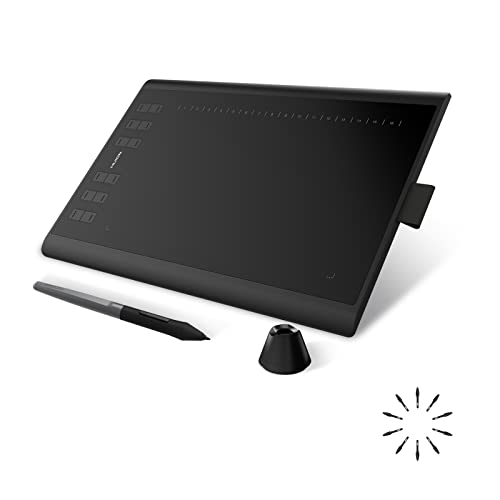
The HUION Inspiroy H1060P provides a large 10 x 6.25 inch working area with a battery-free PW100 stylus and a tilt function up to ±60 degrees. It includes 12 programmable keys plus soft keys to tailor shortcuts, which helps accelerate Illustrator tasks like brush adjustments and navigation. Compatibility with Windows, macOS, and Android expands where it can be used, while the light, slim design supports comfortable, long drawing sessions.
UGEE M708 10×6 Inch Graphic Tablet
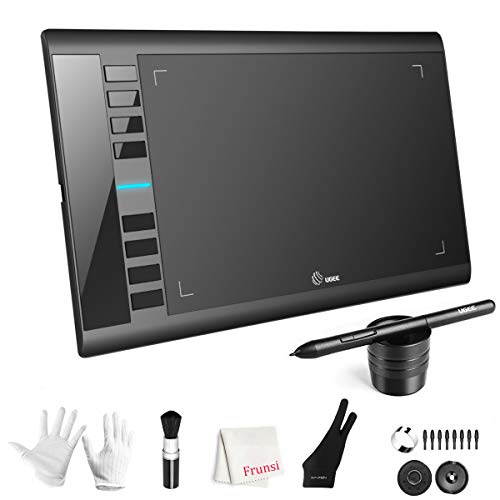
The UGEE M708 offers a sizeable 10 x 6 inch active drawing area and uses 8192 levels of passive stylus pressure. It supports multiple operating systems and popular design software, making it a practical entry point for Illustrator users who want a straightforward, affordable solution without sacrificing essential features. The papery texture surface helps simulate traditional drawing, which can improve stroke control for vector work.
XP-Pen Deco 01 V3 Drawing Tablet

The Deco 01 V3 brings 16,384 pressure levels with up to 60-degree tilt and a battery-free stylus. It features eight customizable quick keys and Android compatibility, making it versatile for Illustrator users who may also work on Android devices. Its beginner-friendly setup and ergonomic design help reduce fatigue during long drafting sessions while enabling precise line control and shading.
XP-Pen 13.3″ Artist13.3 Pro V2

The Artist13.3 Pro V2 combines a full-color 13.3-inch IPS display with 16,384-level pressure sensitivity and a tilt function, delivering precise, natural brushwork. Its Red Dial and eight shortcut keys streamline Illustrator workflows, while the included X3 Pro stylus minimizes latency for cleaner vector lines and smoother shading. This option suits professionals who want a dedicated screen tablet that integrates directly into their creative pipeline.
XP-Pen Upgraded Artist13.3 Pro V2 (Another Variant)

This upgraded 13.3-inch tablet features 16,384 pressure levels with improved accuracy and faster response. The Red Dial Quick Key enables efficient control of brush size and zoom, while eight customizable keys support streamlined Illustrator actions. The 13.3-inch full-laminated screen delivers color accuracy suited for print-ready vector work, aiding precise path creation and shading in graphic design projects.
Buying Guide: Key Purchase Considerations for Adobe Illustrator
- Display or non-display: Display tablets (Pen Displays) show your work directly on the screen, which can improve accuracy in Illustrator when mapping colors and viewing lines before export. Non-display tablets require you to look at your monitor while drawing on the tablet, which can be more ergonomic for some users.
- Pen pressure and tilt: Aim for at least 8192 levels of pressure and tilt support if you frequently adjust brush sizes and shading. Tilt can help you achieve natural gradients and cross-hatching in vector art.
- Active area: A larger drawing area provides more room for detailed Illustrator work, but consider desk space and portability. Common good ranges are 9–12 inches for non-display tablets and 10–13 inches for displays.
- Stylus type: Battery-free EMR or pressure-enabled active pens reduce interruptions from charging. Ensure the stylus has a comfortable grip and a responsive tip for precise path creation.
- Keyboard shortcuts and dial controls: Extra keys and dials let you map frequent Illustrator actions (brush size, zoom, undo, layers) to hardware controls, accelerating workflow.
- Software compatibility: Most tablets support Windows and macOS; some add Android compatibility. Verify driver support for Illustrator and other Creative Cloud apps.
- Calibration and color accuracy: If you work with print or branding assets, color accuracy matters. Full-laminated displays and wide color gamuts (e.g., sRGB, Adobe RGB) are beneficial.
- Ergonomics and setup: A comfortable stand or tilt range supports long sessions. Consider whether you need a display angle that reduces neck and wrist strain.
- Price-to-performance: Entry-level options provide essential features for beginners, while mid-range models balance display, pressure sensitivity, and shortcuts for more advanced Illustrator work.
- Future-proofing: If you plan to grow into more complex digital art or motion design, a display tablet with higher resolution, wider color gamut, and robust driver support offers long-term value.