What’s in this guide
Finding a reliable drawing stylus for iPad involves balancing precision, response, compatibility, and battery life. The following selections focus on models that work with a wide range of iPad generations from 2018 onward, including Pro, Air, Mini, and standard iPads. Each option emphasizes accurate tips, tilt sensitivity, fast charging, and palm rejection features where available. The list includes styluses that do not require Bluetooth pairing, USB-C charging, and reliable replacement tips for long-term use. Use the quick-reference table below to compare core details at a glance.
| Product | Brand | Model Range | Charging | Note on Compatibility |
|---|---|---|---|---|
| Stylus Pen for iPad 6th-11th Gen | JAMJAKE | iPad 6-11, Pro, Air, Mini (2018-2025) | USB-C 10-min quick charge | Not for iPhone/Android |
| Stylus Pen 10th Gen | MEKO | iPad 2018+ (6th-11th Gen), Pro/M4, Air/M3/M2, Mini 5/6 | USB-C quick charge | Bluetooth optional pairing guidance |
| Metapen Pencil A8 | metapen | iPad 2018-2025, Pro, Air, Mini | USB-C 30 minutes to charge | 2x tip durability |
| Bopomofo Stylus Pen (5-pack) | Bopomofo | All touchscreens (universal) | Battery-free design (no charging) | Disc tip + fiber tip dual ends |
| KEEPRO Stylus Pen | KEEPRO | iPad models 2018+ including M4 Pro | USB-C fast charging | No pressure sensitivity |
JAMJAKE Stylus Pen for iPad 2018-2025 (2x Fast Charge)

The JAMJAKE stylus is designed for broad iPad compatibility from 2018 through 2025, covering iPad Pro 11″ and 12.9″ generations (including M4), iPad Air variants (3rd to 5th, M2/M3), iPad mini 5/6, and iPad models from 6th to 11th generation. It emphasizes precise signal and comfortable handling with a 1.5mm pen tip for fine instruction. The device is easy to install and replace tips without tools. It is not designed for earlier iPad models (pre-2018) or non-iPad devices. The stylus does not list pressure sensitivity, but aims for low latency and solid line accuracy for drawing and note-taking. For best results, confirm device compatibility before purchase and avoid mixing with incompatible models.
MEKO Stylus Pen for iPad Pencil 10th Gen
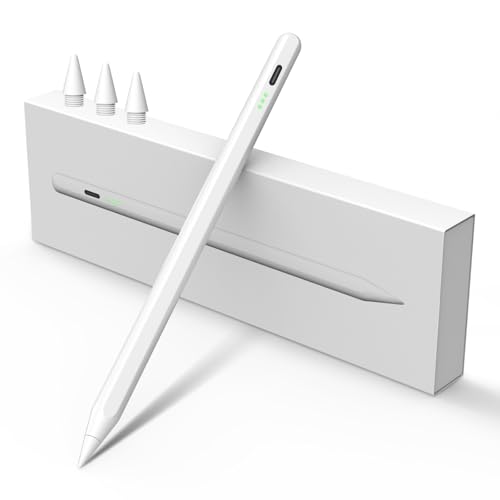
MEKO’s stylus offers a simple, Bluetooth-free experience with straightforward power on/off on the tip. A quick 10–13 minute charge yields up to 9 hours of active use, with automatic standby after 10 minutes of inactivity to save power. It emphasizes tilt-insensitive drawing and compatibility across iPads released in 2018 or later, including iPad Pro, Air, and Mini lines. The user should verify their iPad’s exact model name via Settings>General>About to ensure compatibility. No Bluetooth pairing required, and the device includes a tip replacement routine for longevity.
Metapen Pencil A8 for Apple iPad

Metapen A8 offers 0.1 mm pixel-precise input with high responsiveness, aiming to emulate pencil-like precision for fine lines and small text. It charges in about 30 minutes via USB-C and delivers up to 10 hours of use. The stylus features a dual-tips design and a 5-minute inactivity auto-shutdown for energy efficiency, with LED indicators showing battery status. Note that pressure sensitivity is not supported, but tip durability is emphasized—two extra tips are included to extend life and reduce replacement costs. It is compatible with iPads released since 2018 and later generations across several models.
Bopomofo Stylus Pen, 5-Pack (2-in-1)

This 5-pack combination stylus provides both a disc tip and a fiber tip for versatile use across touch screens, including iPad and iPhone devices. The disc tip offers high precision for drawing and handwriting, while the fiber tip is designed for smooth browsing and scrolling. It is a Bluetooth-free, low-friction option with a lightweight alloy body that aims for comfort and reliability. The design emphasizes immediate usability without charging or pairing, suitable for students, artists, and professionals who want a quick, multi-purpose stylus set.
KEEPRO Stylus Pen for iPad 2018-2025

KEEPRO presents a USB-C fast-charging stylus designed for a broad range of iPad generations from 2018 onward, including iPad Pro M4 and various iPad Air and Mini models. It emphasizes tilt sensitivity and pixel precision with replaceable tips for longevity. The pen notes that pressure sensitivity is not included, which may be a consideration for users seeking advanced pressure dynamics. It’s a practical choice for sketching, note-taking, and general drawing tasks where fast charging and long battery life are priorities. The device involves a Bluetooth pairing workflow only if used beyond basic features, so users should follow the setup steps accordingly.
Buying Guide: Key Purchase Considerations
- Compatibility: Confirm your exact iPad model and generation to ensure the stylus supports it. Some pens list broad support (2018+), but may exclude earlier iPads.
- Charging and Battery Life: USB-C fast charging is common; look for 10–30 minute charges yielding several hours of use. Consider standby features to save energy when inactive.
- Tip Design and Durability: Pixel-precise or disc tips improve accuracy; replaceable tips extend life. Check tip durability ratings if you sketch frequently.
- Pressure and Tilt: Some styluses offer tilt sensitivity or note that there is no pressure sensitivity. Choose based on your drawing style and needs (illustration vs. note-taking).
- Bluetooth Dependence: Some models require Bluetooth for certain features or power indicators, while others operate without pairing. Decide if you want Bluetooth features such as palm rejection or power status display.
- Build and Comfort: Lightweight metal bodies with comfortable grips suit long sessions. Consider the weight balance, tip feel, and aesthetic fit with your device.
- Value and Accessories: Many bundles include replacement tips, charging cables, and soft tips for different tasks. A multi-pack can be cost-effective for frequent users.
- Use Case Perspective: For artists, prioritize high precision, tilt, and tip durability. For students and note-takers, ease of use, lack of pairing, and reliable charge are critical.