What’s in this guide
- Creality Sprite Extruder Pro Kit for Ender 3 Series
- Ender 3 Direct Drive Extruder Kit (Wolias)
- Creality Sprite Extruder Pro Upgrade Kit
- UniTak3D Direct Drive Upgrade Bracket for Ender 3 Series
- Microswiss Direct Drive Extruder for Ender 3
- Buying Guide: Key Considerations For Choosing A Direct Drive Extruder
Direct drive extruders offer improved filament control, especially with flexible materials, on Ender 3 printers. This guide highlights five leading options that enhance extrusion, reduce jams, and support high-temperature printing. Each option expands the printer’s capabilities whether you’re printing PLA, PETG, TPU, or ABS. Explore these picks to boost reliability, simplify maintenance, and achieve smoother, more precise feeds on Ender 3 series machines.
| Product | Brand | Key Benefit |
|---|---|---|
| Creality Sprite Extruder Pro Kit | Creality | All-metal hotend, dual gear feeding, supports high-temp plastics |
| Ender 3 Direct Drive Extruder Kit | Wolias | Easy Bowden-to-Direct swap, smooth feeding |
| Creality Sprite Extruder Pro Upgrade Kit | Creality | All-metal design, supports direct extrusion up to 300°C |
| UniTak3D Direct Drive Upgrade Bracket | UniTak3D | Stable, split-bracket design for Ender 3 V2/Pro and compatible printers |
| Microswiss Direct Drive Extruder | Micro-Swiss | Wide compatibility with Ender 3 family, reliable dual-gear feed |
Introduction complete. Below are five carefully chosen direct drive extruders tailored to Ender 3 printers. Each product section includes a concise overview, main features, and practical notes to help compare performance, installation, and compatibility.
Creality Sprite Extruder Pro Kit for Ender 3 Series

This all-metal direct drive extruder integrates with the Ender 3 family, enabling printing of flexible materials such as TPU, PLA, and PETG. It ships with a short BL Touch/CR Touch connector cable for easy integration and uses a dual-gear feeding system with a 3.5:1 gear ratio to deliver up to 80N of extruder force. The compact design supports both direct and Bowden feeding modes, offering improved control and reliability for everyday and challenging filaments alike.
Ender 3 Direct Drive Extruder Kit (Wolias)
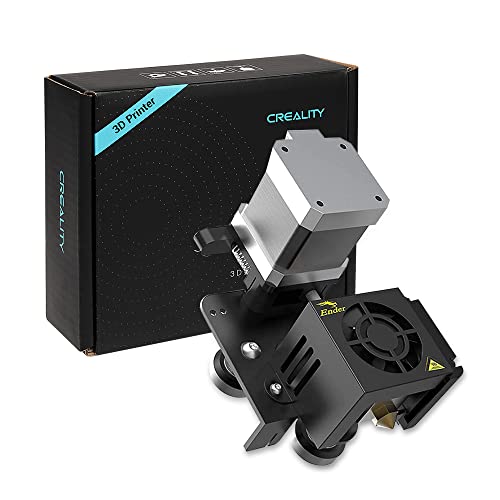
Wolias provides a direct extruder upgrade with a complete kit that converts Bowden to direct extrusion. It includes longer wiring, tools, and installation guidance. By reducing torque requirements on the stepper motor, this setup offers smoother feeding and lower risk of nozzle blockages during retractions and filament changes, improving performance with flexible materials and various filaments.
Creality Sprite Extruder Pro Upgrade Kit

Creality’s Sprite Extruder Pro Upgrade Kit combines all-metal hotend with a direct drive extruder, designed for Ender 3 family printers. It supports high-temperature printing and directs feeding with a 3.5:1 gear ratio, achieving strong, stable extrusion. The compact form factor and dual-gear design reduce filament damage and improve control for PLA, PETG, ABS, and flexible filaments, alongside BL/Touch compatibility features.
UniTak3D Direct Drive Upgrade Bracket for Ender 3 Series
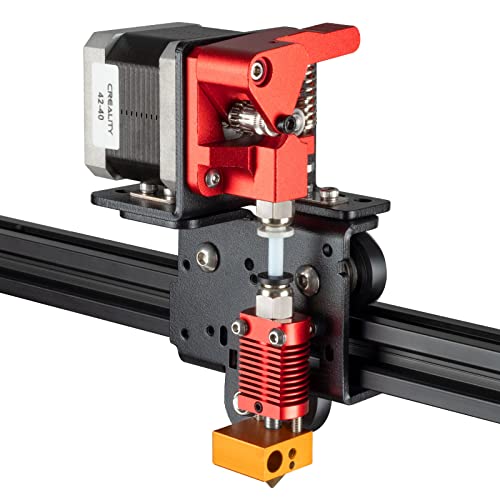
UniTak3D offers a direct drive upgrade bracket compatible with Ender 3 V2/Pro and Voxelab Aquila. This kit emphasizes extrusion control and stability, removing the need for a Bowden tube to improve retraction precision. It is designed with aligned mounting points and balanced weight to maintain printer center of gravity, delivering steadier operation and more consistent layer outputs.
Microswiss Direct Drive Extruder for Ender 3

The Microswiss Direct Drive Extruder provides broad compatibility with Ender 3, Ender 3 Pro, and related models. This dual-gear feed system aims for reliable feeding with 1.75mm filament, supporting flexible materials and standard filaments. It pairs well with the brand’s hotend components and is designed for smoother extrusion, reduced filament stripping, and more precise control during printing.
Buying Guide: Key Considerations For Choosing A Direct Drive Extruder
- Compatibility: Verify Ender 3 model compatibility (Ender 3, Ender 3 Pro, Ender 3 V2, Ender 3 Max, etc.) and whether the kit includes needed mounting brackets or wiring harnesses.
- All-metal hotend: All-metal designs enable higher temperature printing and broaden material support, but check temperature ratings (e.g., up to 300°C or higher) and required firmware adjustments.
- Gear ratio and torque: Dual-gear feeding with a higher gear ratio (e.g., 3.5:1) improves extrusion control and feeding stability, especially with flexible filaments.
- Direct vs Bowden: Direct drive reduces retraction issues and improves reliability with flexible materials; ensure the kit offers a clean path for direct extrusion and easy switching from Bowden if needed.
- Firmware and compatibility notes: Some upgrades require firmware changes or BL Touch/CR Touch compatibility; confirm official guidance and firmware availability.
- Installation complexity: Assess whether the kit is a drop-in upgrade or requires significant disassembly, wiring, and calibration. Look for included tools and diagrams.
- Weight and size: A compact, lightweight extruder minimizes additional stress on the X-axis and maintains print quality; consider overall printer balance.
- Maintenance and parts availability: Consider ongoing replacement parts and community support; widely used kits may have easier troubleshooting and updates.
- Print material focus: If you print many flexible filaments, prioritize direct-drive options with robust feeding and anti-jamming features.
- Cost vs value: Compare price against features, materials supported, and longevity; higher-priced all-metal kits often deliver better temperature stability and durability.
Note: This guide presents objective information about available direct drive extruder upgrades for Ender 3 printers. Specific prices are not included, and installation results may vary by model, firmware, and user skill level.