What’s in this guide
- Cricut Joy Xtra Cutting Machine
- Cricut Explore 4 – Smart Cutting Machine (Seashell)
- Cricut Maker 4 Machine Ultimate Bundle
- Cricut Joy Xtra Machine With Printable Sticker Paper Bundle
- Cricut Printable Waterproof Sticker Set
- Cricut Joy Machine & Digital Content Library Bundle
- Cricut Joy Xtra Machine With Printable Sticker Paper And Card Kit Bundle
- Buying Guide: Key Purchase Considerations
Choosing the right Cricut machine can streamline sticker creation, from simple decals to full-color, print-then-cut designs. This guide highlights five top picks focused on sticker-making capabilities, ease of use, and material versatility. Each option supports popular materials like vinyl, cardstock, and iron-on, with features such as print-then-cut, writing, drawing, foiling, and more. The selection covers compact models for small spaces and feature-rich bundles for extensive sticker projects. Use the buying guide below to compare capabilities and find the best fit for your sticker-focused crafting needs.
| Product | Key Sticker Features | Bundle / Add-ons |
|---|---|---|
| Cricut Joy Xtra Cutting Machine | Print-then-cut full-color designs, vinyl & cardstock, precise cuts | Printer compatibility included |
| Cricut Explore 4 | Fast cuts, 100+ materials, print-enabled via Design Space | Includes Essentials Bundle with vinyl, cardstock, transfer tape |
| Cricut Maker 4 Ultimate Bundle | Supports vinyl, sticker materials, intricate cuts | Extensive material sampler and tools |
| Cricut Joy Xtra Machine With Sticker Paper Bundle | Print-then-cut stickers, portable, Bluetooth | Sticker paper and vinyl sampler included |
| Cricut Printable Waterproof Sticker Set | Printable waterproof vinyl for inkjet printers | Sticker-ready sheets |
The following sections review five Cricut machines or bundles most relevant to sticker enthusiasts. Each entry includes a clickable Amazon link, a product image, and a concise feature overview drawn from the listed specifications.
Cricut Joy Xtra Cutting Machine

The Cricut Joy Xtra is a compact, Bluetooth-enabled cutting machine designed to fit small spaces while offering flexible sticker-making options. It supports 50+ materials, including vinyl, iron-on, and cardstock, and can print then cut full-color designs when paired with a home inkjet printer. The device adds writing, drawing, and foiling capabilities through interchangeable blades, enabling intricate sticker designs with precision. Its small footprint and versatility make it a strong choice for hobbyists focused on quick, colorful stickers and decals.
Cricut Explore 4 – Smart Cutting Machine (Seashell)

The Cricut Explore 4 combines faster cutting with broad material support, including vinyl, cardstock, and iron-on. It works with a variety of bundles that add tools, mats, and a materials sampler. The built-in capabilities enable precision cuts for complex sticker designs, while the included 25 digital designs in Design Space expand creative options. This model is well-suited for crafters who want higher throughput and versatile material handling for sticker projects, decals, and custom labels.
Cricut Maker 4 Machine Ultimate Bundle

The Cricut Maker 4 is a feature-rich option ideal for sticker creators who want extensive material options and robust tooling. The Ultimate Bundle includes vinyl sheets, iron-on, Infusible Ink, waterproof sticker materials, and a full set of cutting mats and tools. The machine’s digital guide and SVG designs facilitate a broad range of sticker projects, from simple decals to more complex designs requiring precise cuts and finishing touches. It’s designed for both beginners and experienced crafters pursuing large sticker runs.
Cricut Joy Xtra Machine With Printable Sticker Paper Bundle

This bundle centers on sticker-making, combining the Joy Xtra with printable sticker paper and vinyl sampler materials. The Joy Xtra’s strengths—Print-then-Cut, Bluetooth, and compatibility with an inkjet printer—make it straightforward to produce full-color stickers. The bundle’s sticker papers and vinyl samples provide immediate materials to create and test sticker designs without sourcing additional supplies.
Cricut Printable Waterproof Sticker Set
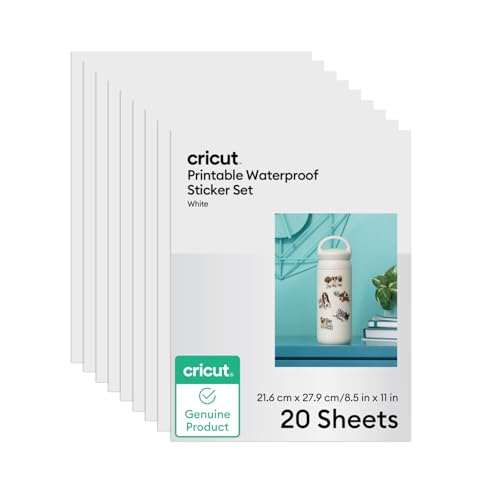
The Printable Waterproof Sticker Set provides 20 sheets of printable vinyl and a laminate layer designed for inkjet printers. Ideal for durable sticker projects, this set emphasizes water resistance and UV protection for lasting outdoor or item-adjacent decals. It’s a practical add-on for sticker enthusiasts who want to produce weather-resistant designs with compatible Cricut machines.
Cricut Joy Machine & Digital Content Library Bundle

The Joy Machine with the Digital Content Library Bundle pairs a compact cutting machine with 30 digital images from Design Space. It’s suited for crafters who want ready-to-use sticker templates and a portable setup. The bundle emphasizes ease of use and quick project initiation for sticker-focused crafts, with the same material versatility as other Joy offerings, including vinyl and cardstock cuts, plus mat-free cutting with Smart Materials.
Cricut Joy Xtra Machine With Printable Sticker Paper And Card Kit Bundle

The Joy Xtra bundle with printable sticker paper and card kit focuses on sticker production and mixed-media projects. It reiterates Joy Xtra’s capabilities—print-then-cut, writing, drawing, and foiling—along with materials suitable for sticker designs. This kit provides a convenient all-in-one option for beginners seeking a complete sticker creation setup with printer-ready designs.
Buying Guide: Key Purchase Considerations
- Material compatibility: Ensure the machine supports vinyl, cardstock, iron-on, and any other sticker media you plan to use. Some models excel at mat-based cutting, others perform well with matless cutting (Smart Materials).
- Print-then-cut capabilities: If you want full-color stickers, prioritize machines that pair with inkjet printers for print-then-cut workflows and Design Space compatibility.
- Bundled materials: Bundles can save time sourcing vinyl, sticker paper, and transfer tape. Compare included items to determine total value for sticker projects.
- Portability and space: Compact machines fit small studios or kitchens; larger models offer broader material support but require more workspace.
- Connectivity: Bluetooth-enabled devices simplify setup and mobile crafting. Check whether you need a wired connection or app-based design workflow.
- Software and content library: Access to Design Space is essential for sticker templates, fonts, and SVGs. Some bundles include extra digital content for immediate use.
- Warranty and support: Look for manufacturer warranties and customer service resources, especially for beginners who may need troubleshooting guidance.
- Learning curve: Beginner-friendly models with guided tutorials and easy templates can shorten the time to first sticker success, while advanced users may value deeper customization.
- Budget and long-term value: Weigh upfront cost against included materials, tools, and potential ongoing material purchases to determine long-term sticker-making value.
- Future-proofing: If you expect expanding sticker projects (more complex shapes, foiling, or multi-layer designs), consider a versatile machine that supports a wide material range and additional tools.