What’s in this guide
Finding the right CO2 laser engraver for a small business involves balancing power, accuracy, ease of use, and expandability. The following selections are well-suited for startups and growing shops, offering solid performance, reliable support, and compatibility with popular design software. Each entry includes practical capabilities for engraving and cutting across materials like wood, acrylic, fabric, glass, and metal accents when paired with marking fluids or proper settings. Use this guide to compare entry-level to pro-grade options and identify the best fit for your production needs.
| Product | Approx. Power | Working Area | Primary Strength | Best For |
|---|---|---|---|---|
| OMTech K40+ 45W | 45W | 12″ x 8″ | Fast cutting, solid support | Small-batch production |
| VEVOR 50W CO2 | 50W | 12″ x 20″ | Large bed, versatile materials | Creative prototyping |
| xTool P2 55W | 55W | 26″ x 14″ | Curved surface engraving, high speed | Custom gifts, signage |
| Glowforge Plus | 40W | Various (600×500+) | Ease of use, cloud-based workflow | Quick setup, education |
| ATOMSTACK A20 Pro V2 | 20W | Size varies by model | Precision and safety | Gift items, small runs |
Note: The table highlights typical strengths. Availability and specifications can vary by model and region. Review software compatibility, service options, and optional accessories when evaluating a purchase for a small business.
OMTech K40+ 45W CO2 Laser Engraver

The OMTech K40+ 45W model provides a robust entry point for small businesses seeking dependable engraving and light-cutting performance. Key features include an upgraded 45W laser capable of cutting through 0.4″ acrylic and 0.31″ wood, and an engraving speed up to 300 mm/s for efficient production. Global support and a two-year service program offer reassurance for new shop owners prioritizing reliability and local demos. Its compact 12″ x 8″ working area fits home studios and growing storefronts while maintaining room for iterative projects.
For workflow, the K40+ integrates with popular software ecosystems (LaserGRBL, LightBurn compatibility), enabling straightforward design-to-cut pipelines. The combination of power and speed supports a variety of small-batch orders, from personalized gifts to signage. Keep in mind that edge quality and material choice influence results; for deeper cuts on dense woods or thick acrylic, consider multiple passes or slower feed rates. Accessories such as air assist can further improve cut quality and prevent flaming on some materials.
VEVOR 50W CO2 Laser Engraver
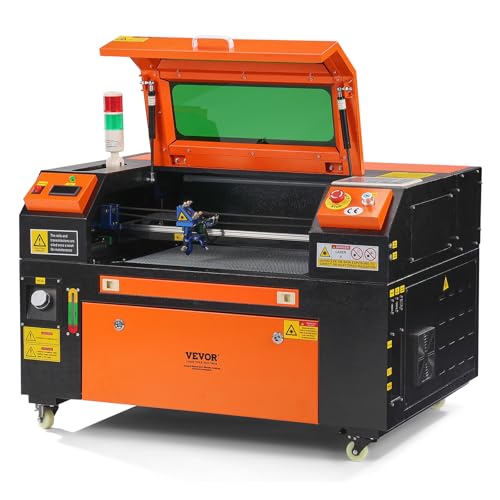
VEVOR’s 50W CO2 laser engraver offers a spacious 12″ x 20″ working area and a two-way pass air assist system. It can cut up to 0.24 inches (6 mm) in a single pass and engrave on a wide material spectrum, including wood, acrylic, fabric, glass, leather, and more than 1000 materials. The digital control panel is designed to work with third-party software such as LightBurn, CorelDRAW, and AutoCAD, with broad OS compatibility (Windows, Mac OS, Linux). The front and back pass-through doors enable flexible handling of longer pieces, making it a strong option for small shops expanding into larger custom pieces or bulk orders.
Operational versatility is paired with a Class 1 safety rating for user protection. The device’s frame and bed design help maintain stable heat management and alignment during longer jobs. As with any CO2 system, ventilation and proper enclosure are important for air quality and dust control. While robust, the ideal use-case involves mid-sized runs with consistent material types to maximize throughput and minimize setup time.
xTool P2 55W CO2 Laser Cutter

The xTool P2 stands out with a 26″ x 14″ bed and a 55W laser, delivering strong performance for both engraving and cutting tasks. Dual 16MP smart cameras enable automatic modeling of curved objects for precise curved-surface engraving, and they work with automatic feeders for higher throughput. The bed size and high engraving speed (up to 600 mm/s) support ambitious projects, including large signage, intricate gifts, and batch production. A larger engraving height (2.7 inches) expands the range of items you can process, especially when combined with optional riser upgrades for taller pieces.
Compatibility stretches across popular design tools, including LightBurn, CorelDRAW, and AutoCAD, with flexible file transfer options. For businesses handling curved surfaces, the P2’s intelligent recognition and batch engraving capabilities can reduce design-to-output time. Dust management, proper ventilation, and stable routing of power and data lines are recommended for continuous operation. The P2’s higher power and larger footprint are best suited for shops ready to scale from compact workstations to a more production-focused setup.
Glowforge Plus HD Laser Cutter and Engraver

Glowforge Plus HD emphasizes ease of use and a strong software ecosystem, featuring a 40W CO2 laser and a streamlined cloud-driven workflow. The system includes autofocus and material detection, with a free software suite that sits on PC, Mac, or mobile devices. Its design supports rapid iteration and learning, making it appealing for makers, educators, and small businesses exploring gift items, custom décor, and personalized products. Operation relies on internet connectivity and Glowforge’s software stack, which simplifies setup and ongoing project management for non-technical users.
From a business perspective, Glowforge Plus offers fast onboarding and predictable output for beginner-to-intermediate users. However, potential buyers should weigh ongoing software updates and cloud requirements against standalone offline workflows. The platform’s broad material compatibility enables diverse product lines, while the compact footprint helps fit tight studio spaces. For teams prioritizing speed-to-market and intuitive design tools, Glowforge provides a compelling option with a robust community and support network.
ATOMSTACK A20 Pro V2 20W Laser Engraver

The ATOMSTACK A20 Pro V2 is a more compact option, delivering 20W of laser power with precision-focused engraving. It emphasizes safety and assembly practicality, featuring an integrated linear guide motion structure, a modular aluminum frame, and built-in limit switches with 0.01 mm engraving accuracy. A removable magnetic protective cover, safety glasses, and tilt-angle safety features contribute to a safer workspace for small teams or individuals. The device prioritizes easy setup and dependable performance for personalized gifts, business cards, and small-scale production tasks.
Business-facing considerations include the balance between speed, material compatibility, and the need for expansion as demand grows. While the 20W class is ideal for light-duty tasks and rapid prototyping, plan for gradual upgrades or accessory additions if your output increases. Proper ventilation and enclosure remain essential to maintain a safe and productive work environment.
Buying Guide
- Power and throughput: Higher wattage delivers faster cutting and deeper engraving, but may come with a larger footprint and higher running costs. Assess typical material thickness and the volume of orders you expect to handle.
- Bed size and expansion: A larger bed enables bigger parts and batch runs but requires more space. Consider future needs, such as additional rotary attachments or pass-through access.
- Software and ecosystem: Compatibility with LightBurn, CorelDRAW, AutoCAD, and other tools reduces learning curves. Check for offline vs. cloud-based workflows and the availability of updates and drivers.
- Ease of use and safety: Features like autofocus, air assist, pass-through doors, lid safety switches, and protective enclosures improve safety and efficiency for daily operations.
- Service and support: Local demos, remote assistance, and warranty coverage help minimize downtime. Look for vendors offering training resources and quick-response support.
- Materials and versatility: Most CO2 lasers work well with wood, acrylic, fabric, leather, and some plastics. For metals, consider marking fluids or alternative laser types, and verify compatibility with your intended marking strategy.
- Maintenance and running costs: Consider consumables (gas, nozzles, oils), replacement parts, and maintenance frequency to estimate long-term costs.
When selecting a CO2 laser engraver for a small business, map your product roadmap to the machine’s capabilities. Start with a model that offers solid support, a comfortable work area, and clear upgrade paths. This approach minimizes the risk of over-investing while ensuring you can scale up as demand grows and your product lines expand.