What’s in this guide
Finding the right blending brushes can elevate Procreate projects by delivering soft transitions, smooth gradients, and a natural paint-like feel. This guide highlights five widely used blending brush options that artists reach for when working on digital canvases. Each pick is evaluated for texture, control, and versatility to help you achieve professional results in your Procreate workflow.
| Product | Brand | Key Feature |
|---|---|---|
| YOUEON 8 Color Flat Top Ink Blending Brushes | Youeon | Flat top for large area blending; color-coded storage |
| 10 Pack Ink Blending Brushes for Card Making | Generic | Soft nylon bristles; bendable, anti-slip handles |
| UNIMEIX 6 Pack Blending Brush | UNIMEIX | Toothbrush-shaped for direction control |
| NYX PROFESSIONAL MAKEUP Pro Blending Brush | NYX PROFESSIONAL MAKEUP | Two-tone vegan bristles; versatile for makeup and art |
| YEWANG 10 PCS Ink Blending Brushes | YEWANG | Color-coded handles; soft bristles for smooth blending |
YOUEON 8 Color Flat Top Ink Blending Brushes

The YOUEON brush set uses pure white, soft bristles designed for smooth mixing on cards and papers, with a flat-top shape ideal for broad ink blending. The eight-color coded handles help organize tools by shade while the color-matched bases simplify storage. Ergonomic, non-slip handles reduce fatigue during extended blending sessions. While marketed for crafts, the brush style supports soft, even blending that digital artists can emulate with Procreate brush textures by adjusting brush density and flow to mirror ink blending on a digital surface.
Features to note include the flat top head that covers larger surface areas, densely packed bristles for seamless color mixing, and a non-slip grip that supports precise control. The included color coding makes it easy to match brushes to specific palettes, which can translate into a disciplined approach when organizing Procreate brush sets and layers by hue or temperature for a cohesive composition.
10 Pack Ink Blending Brushes for Card Making
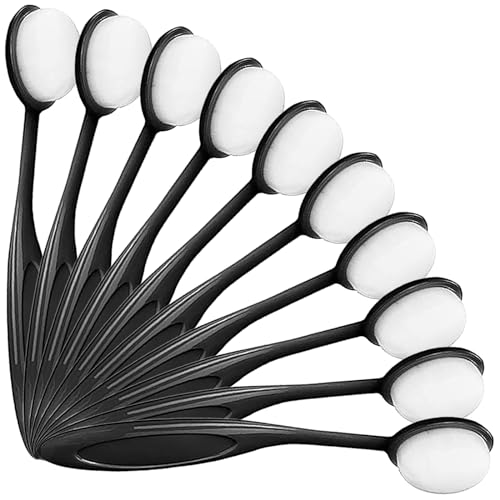
This set emphasizes soft nylon wool bristles with bendable silicone handles for flexible control. The guides highlight suitability for water-based inks and a variety of paper crafts, which can parallel digital blending tasks by providing a sense of pressure, angle, and stroke length that artists mimic when building brush textures in Procreate. The color-coded aspect of this bundle aids in quickly selecting the right tool for a given texture or gradient, supporting an efficient workflow when preparing digital stroke libraries or presets.
The brushes are described as durable and wearable for long sessions, with an emphasis on avoiding fatigue. The natural softness of the bristles helps in creating smooth transitions, a desirable trait for digital equivalents where brush density and opacity can be tuned to achieve a similar effect in Procreate layers and smudge tools.
UNIMEIX 6 Pack Blending Brush for Card Making

UNIMEIX offers a 6-pack set with a toothbrush-like shape designed for directional control and efficient blending. The nylon hair bristles are soft, offering a gentle touch suitable for layering and feathering strokes—qualities that digital artists can translate into Procreate by adjusting brush opacity and flow to mimic incremental color buildup. The sturdy plastic handles are described as durable and flexible, enabling varied pressure and angles without fatigue, a trait useful for long drawing sessions where blended gradients matter.
These brushes are framed as suitable for water-based inks and background work, making them versatile for card making and crafting. In a Procreate context, this translates to brushes that can be tuned for soft edge blending or crisp edge retention depending on how you set brush settings and textures in your digital toolkit.
NYX PROFESSIONAL MAKEUP Pro Blending Brush

The NYX Pro Blending Brush features long, rounded, two-tone vegan bristles designed for smooth blending across textures, originally intended for eyeshadow but widely used by artists for softening edges in artwork. Its ergonomic handle supports comfortable, controlled strokes which translate well to Procreate workflows when simulating blending on digital layers. The brush’s versatility allows it to be employed for shading, pushing color into the crease, or softening transitions—paralleling typical Procreate techniques for achieving balanced color harmony in a composition.
For digital artists, the key takeaway is a focus on feathered edges and flexible bristle feel. When emulating this brush in Procreate, you might combine a soft round brush with a low flow, then use a smudge tool to mimic subtle smoothing, producing a natural gradient similar to the makeup brush’s effect on skin tones or eyeshadows.
YEWANG 10 PCS Ink Blending Brushes

YEWANG provides a set of ten color-coded handles paired with soft nylon bristle heads for smooth ink blending. The color-coding helps manage multiple hues efficiently, a practical approach for digital artists who organize brush presets by color families. Durable, skin-friendly handles reduce fatigue, supporting longer creative sessions. The set emphasizes clean bristles that shed less, ensuring consistent blending performance—an important consideration when translating physical brush behavior into Procreate texture brushes and blending modes.
In practice, these brushes encourage precise control and clean color separation. To emulate in Procreate, you can simulate multiple blends by layering with different opacity levels, applying light passes across a canvas, and using Gaussian or motion blur filters to approximate smooth transitions between hues or tones.
Buying Guide: Key Purchase Considerations for Digital and Hybrid Blending Tools
When selecting blending brushes for Procreate, consider how the physical brush characteristics translate to digital behavior. Look for these factors to build a versatile toolkit:
- Brush shape and head density: Flat tops, round tips, and dense bristles influence stroke width and edge softness. In Procreate, choose brush textures that mimic these traits to achieve broad swaths or delicate feathering.
- Bristle material and feel: Natural fibers tend to offer forgiving blends; synthetic bristles provide consistent performance and easier digital translation via textured brushes or grainy noise overlays.
- Handle design and ergonomics: While digital work doesn’t require physical grip, a comfortable feel during real-world painting sessions can inform your approach to layering, pressure sensitivity, and tilt usage in Procreate.
- Color-coding and organization: Grouping brushes by hue, density, or texture helps maintain a cohesive workflow, especially when building complex Procreate palettes and brush sets.
- Durability and maintenance: Durable tools require less frequent replacement and support sustained practice, which is valuable for artists refining digital blending techniques over time.
- Compatibility with ink vs. pigment: For mixed-media inspiration, blending tools designed for inks or paints can inform digital brush textures that emulate pigment bleed or diffusion effects in Procreate.
Performance considerations vary by artist. Some prefer soft bristles for delicate gradients, while others favor stiffer heads for bold, controlled blends. A balanced kit often includes both large-area blenders for washes and smaller, precise tools for details. In Procreate, pairing soft textured brushes with a few harder-edge brushes and a subtle smudging approach can mimic a broad range of real-world blending behaviors, enabling richer, more natural visuals.