What’s in this guide
Starting with digital drawing and animation can be a rewarding experience, especially with a beginner-friendly tablet. The right device blends responsive pen input, a comfortable drawing area, and accessible software compatibility. Below are five tablets well-suited for newcomers who want reliable performance without a steep learning curve. Each option balances value, usability, and feature sets to support learning curves and creative exploration.
| Product | Brand | Key Benefit |
|---|---|---|
| Inspiroy H1060P | HUION | Large working area with a battery-free stylus |
| KAMVAS Pro 16 | HUION | High-quality screen with color accuracy |
| Artist13.3 Pro V2 | XP-Pen | Compact screen tablet with precise pen input |
| Inspiroy H640P | HUION | Portable and affordable with battery-free stylus |
| Kamvas Slate 10 | HUION | Standalone drawing tablet for on-the-go creativity |
Inspiroy H1060P: Large Graphics Tablet With Battery-Free Stylus
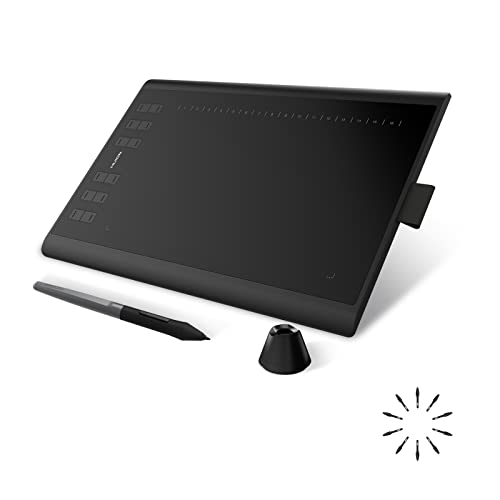
The Inspiroy H1060P from HUION offers a generous 10 x 6.25 inch working area, which is a comfortable size for beginners to practice lines, shapes, and simple animations. The PW100 battery-free stylus provides continuous drawing without charging interruptions, and its ±60° tilt support mimics natural brush and pencil strokes, helping new artists experiment with shading and line variation. Twelve programmable keys plus sixteen soft keys enable convenient shortcuts, streamlining typical animation workflows like erasing, zooming, and panning. This combination of space, pen performance, and shortcut customization makes it a strong starter option for students and hobbyists learning rigging, frame-by-frame basics, and digital ink work.
KAMVAS Pro 16 Drawing Tablet With Screen
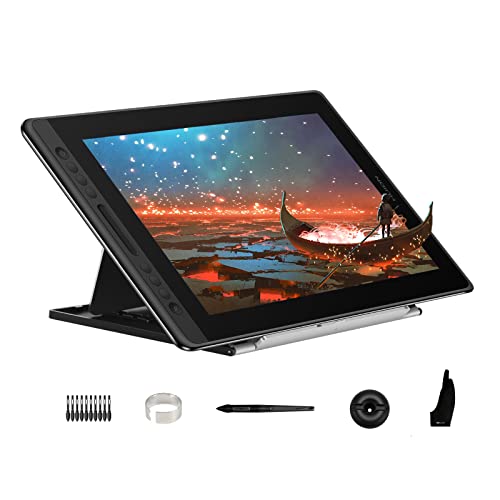
The Kamvas Pro 16 pairs a 15.6-inch screen with a full-laminated, anti-glare surface to deliver immersive visuals and precise on-screen drawing. Its expansive color gamut (approximately 120% sRGB and 92% Adobe RGB) makes color decisions in animation more accurate, which is essential when choosing skin tones or lighting in scenes. The built-in 6 express keys and a touch bar provide quick access to common tools, allowing animators to adjust brush sizes, zoom, or switch tools without breaking the drawing flow. Ideal for beginners moving toward more complex frame-by-frame work or small animation projects that benefit from direct-to-screen feedback.
Artist13.3 Pro V2: 13.3-Inch Drawing Tablet With Screen

The XP-Pen Artist13.3 Pro V2 offers a 13.3-inch full HD display with 16,384 levels of pressure sensitivity and ±60° tilt recognition, delivering responsive, nuanced strokes ideal for animation line work and shading studies. The red dial and eight shortcut keys optimize a fast, customized workflow for animation apps, and the device supports Android, Windows, and macOS. With true-to-life color accuracy (99% sRGB, 89% Adobe RGB) and a 250-nit brightness level, beginners can begin with simple character explorations and progress toward more sophisticated frame sequences as skills grow. The included replacement nibs further support long-term practice sessions without frequent replacements.
Inspiroy H640P: Compact, Portable Drawing Tablet

The H640P provides a compact layout with a 6 x 4 inch drawing area and a battery-free PW100 stylus offering 8192 pressure levels. Its light weight and slim profile make it ideal for students and beginners who want a portable device for practice anywhere. The six programmable keys enable quick access to essential functions in animation software, streamlining repetitive actions like inking, erasing, or adjusting brush size. While smaller, it remains a practical stepping stone for learning line work, basic shading, and keyframe planning without a high upfront investment.
Kamvas Slate 10 Standalone Drawing Tablet

The Kamvas Slate 10 is a standalone Android tablet, meaning you can draw directly without a computer. Its 10.1-inch Full HD IPS display covers over 16 million colors, providing bright, accurate visuals for frame planning and character design. The rechargeable pen delivers 4096-level pressure sensitivity with tilt, supporting smooth brushwork and shading. The inclusion of a magnetic pen storage helps prevent loss, while the standalone design makes it a compelling option for beginners who want an all-in-one device to practice animation basics, storyboarding, and quick concept sketches on the go.
Buying Guide: Key Considerations For Beginners
When choosing a tablet for animation starters, consider how you plan to learn and what you want to create. The following factors help compare common options and select the best fit.
- Drawing area and portability: A larger working surface (around 10 inches) provides room for early sketches, but compact tablets are easier to transport to classes or meetups.
- Pen technology: Battery-free pens reduce maintenance and interruptions. Look for high pressure sensitivity (8192–16,384 levels) and tilt support to explore shading and brush dynamics.
- Display vs. non-display: Screen tablets (pen displays) let you draw directly on-screen, offering intuitive practice for animation, while non-display tablets require looking at a separate monitor. Display quality, color accuracy, and brightness matter for line tests and color decisions.
- Shortcut customization: Programmable keys and touch strips speed up workflows in animation software, enabling quick access to common tools like brush size, undo, layers, and playback controls.
- Software compatibility: Ensure the tablet works with your preferred OS (Windows, macOS, Android) and animation programs (Toon Boom, Animate CC, Adobe Animate, Blender, etc.).
- Stand-alone capability: Standalone tablets (no computer needed) can be advantageous for note-taking and quick sketches but may offer fewer advanced features than full display tablets.
- Price and learning curve: For beginners, balance cost with core features such as pen responsiveness, driver stability, and customer support. Simpler models often suffice for foundational art and animation training.
- Customer support and warranty: A solid warranty and accessible support can help new users resolve driver or compatibility issues quickly as they learn.
Choosing a device with reliable pen input, a comfortable drawing area, and easy access to learning resources will support steady progress in animation fundamentals—from basic frame planning to more expressive character work. Consider trying a model with a friendly driver interface and helpful tutorials to minimize setup friction during the initial learning phase.