What’s in this guide
For artists who want a complete drawing experience without a computer tether, standalone drawing tablets offer built‑in screens, motion‑friendly pens, and preloaded apps. This guide highlights five top options that blend performance, portability, and value, helping you choose the best all‑in‑one device for sketching, note‑taking, and creative learning on the go. Each pick is evaluated for screen quality, pen feel, storage, and app ecosystem, so you can pick with confidence.
| Product | Brand | Key Benefit |
|---|---|---|
| Wacom MovinkPad 11 | Wacom | Battery‑free pen, Android 14, 8GB/128GB |
| PicassoTab X | Simbans | Affordable standalone 10″ with preloaded apps |
| HUION Note | HUION | Digital notebook feel with app syncing |
| X11 PicassoTab | PicassoTab | 11″ screen with learning package and tutorials |
| Amazon Kindle Scribe | Amazon | Note‑taking, reading, and AI summarization |
Wacom MovinkPad 11 Review

The Wacom MovinkPad 11 is an all‑in‑one Android tablet with a battery‑free Pro Pen 3. Its 11″ etched glass screen reduces glare and supports 8,192 pressure levels. The device runs Android 14 and includes 8GB RAM with 128GB storage, enabling sketching in Wacom Canvas and Clip Studio Paint Debut pre‑installed for up to two years. A key feature is Quick Draw: tap and hold the pen to instantly launch sketch apps, letting creators dive into ideas without waiting for boot times or setup. The Pro Pen 3 provides precise control and keeps nibs stored in the pen back end for convenience. The tablet operates without a computer, making it a compact, mobile studio for artists on the move.
PicassoTab X Drawing Tablet
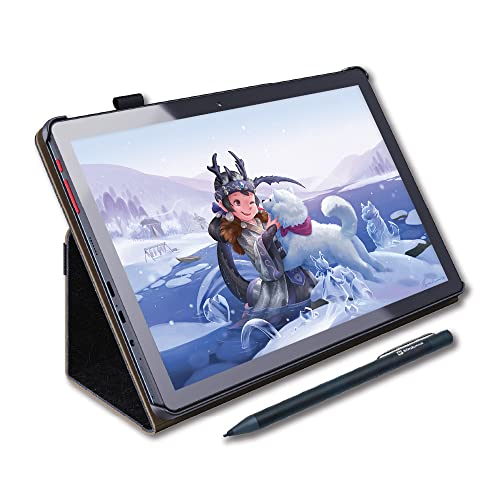
The PicassoTab X is a standalone 10‑inch drawing tablet that ships with drawing and animation apps pre‑installed and includes four bonus items like a tablet case and drawing glove. It is designed for beginners and students who want an inexpensive entry into digital art, with a capable MediaTek quad‑core processor for smooth multitasking. The 64GB storage supports numerous apps from the Google Play ecosystem. The device promises a clear screen, a large disk, and a user‑friendly experience, enabling users to draw, take notes, or animate without needing a separate computer. It targets learners and hobbyists seeking immediate creative tools at an approachable price.
HUION Note 2‑in‑1 Digital Notebook

HUION Note combines a traditional notepad with a digital pen and a companion app, delivering a tactile paper experience alongside digital capture. The digital pen records strokes and preserves handwritten notes in the accompanying app, which syncs with mobile devices on iOS and Android. A notable feature is the ability to record audio to accompany notes, ensuring that the handwriting context isn’t lost. This duality appeals to students, presenters, and creatives who want a seamless handwritten workflow while maintaining the benefits of digital storage and searchability. The product emphasizes offline note‑taking and on‑the‑go digitization for a versatile creative process.
X11 PicassoTab 11″ Screen Tablet

The X11 PicassoTab 11″ is marketed as a complete drawing learning package. It offers an immersive 11‑inch Full HD laminated screen with anti‑glare technology and includes access to premium drawing apps such as Concepts, Infinite Painter, and Flipaclip. The package emphasizes step‑by‑step tutorials via the Artixo app, making it a strong option for beginners who want guided instruction alongside hardware. The combination of a capable display, a stylus, and educational resources makes this standalone tablet appealing to aspiring artists looking to learn by doing in a structured environment.
Amazon Kindle Scribe

Kindle Scribe is a digital notebook device designed for writing, reading, and note organization with a premium pen. It supports AI notebook tools that can summarize handwritten notes, convert handwriting to readable text, and adjust the length and tone of notes. The device aims to minimize distractions by limiting notifications, presenting a focused environment for drafting ideas, drafting commissions, and journaling. While it leans more toward note‑taking and reading than graphic drawing, it remains a solid option for creative writers and researchers who want an all‑in‑one device for writing and document management in a single handheld package.
Buying Guide: Key Purchase Considerations
- Independent vs. continuous connectivity: Standalone devices run without a computer, which is ideal for portability. If you need extensive desktop software support, consider a tablet that can pair with a PC or Mac.
- Screen quality and feel: Look for laminated, anti‑glare displays with wide color coverage (sRGB/Adobe RGB) and low parallax for natural drawing. A matte/gloss choice will affect pen friction and line quality.
- Pen performance: Check pressure levels, tilt support, and button customization. Battery‑free or rechargeable pens impact long‑term comfort and maintenance.
- Apps and ecosystem: Preloaded sketching, note‑taking, and animation apps add value. Ensure compatibility with your preferred software (Procreate, Clip Studio Paint, Krita, Infinite Painter, Concepts, etc.).
- Storage and upgrade paths: 128GB or more helps store apps, textures, brushes, and projects. Consider expansion options or cloud syncing for large files.
- Ergonomics and portability: Weight, thickness, and standability affect daily use. A stable stand or kickstand is helpful for comfortable long sessions.
- Learning aids: Guided tutorials and learning packages can accelerate skill growth, particularly for beginners or students.
All five picks offer standalone drawing capabilities with varying strengths. If you prioritize a robust app ecosystem and a familiar pen experience, the Wacom MovinkPad 11 provides a premium balance of Android flexibility and professional pen performance. For budget‑friendly learning and quick setup, the PicassoTab X and X11 PicassoTab emphasize educational packages and user‑friendly interfaces. The HUION Note focuses on a tactile, analog feel with digital convenience, while Kindle Scribe serves writers and researchers seeking AI‑assisted note management in a single device. Consider your primary use—sketching, note‑taking, or learning—and your preferred software when deciding which fits best.