What’s in this guide
Discover budget-friendly drawing tablets that balance features, performance, and price. This guide highlights five strong options suitable for beginners and hobbyists, emphasizing screen quality, pen responsiveness, and ease of use across Windows, Mac, and Linux. Each product is evaluated on display clarity, color accuracy, pressure sensitivity, shortcut controls, and portability to help you pick the right fit for your creative workflow.
Summary of chosen products
| Product | Brand | Type | |
|---|---|---|---|
| HUION Kamvas Pro 16 | HUION | Pen display tablet | 15.6″ screen, anti-glare, 6 express keys, touch bar |
| XPPen Artist 13.3 Pro | XP-PEN | Pen display tablet | Full-laminated, 60° tilt, wide color gamut |
| TQU LCD Writing Tablet 4-Pack | TQU | LCD doodle boards | 4-pack, erase/save, pressure-style lines |
| Simbans PicassoTab X | Simbans | Standalone drawing tablet | 10″ screen, pre-installed apps, portable |
| HUION Inspiroy H640P | HUION | Battery-free drawing tablet | 6 express keys, compact, 8192 levels |
Huion Kamvas Pro 16 Drawing Tablet With Screen

The Huion Kamvas Pro 16 offers a 15.6-inch full-laminated display with anti-glare glass for clear, distraction-free drawing. It delivers sharp visuals and a textured drawing experience that mimics paper, helping artists control strokes with precision. The device supports a wide color range and high contrast, which enhances shadows and midtones in digital artwork. Six express keys and a touch bar streamline common actions, reducing the need to switch between keyboard and software.
Designed for flexible workflows, this pen display matches Windows, Mac, and Linux environments. The included PW100 battery-free pen provides consistent pressure sensitivity, enabling nuanced shading from light lines to bold strokes. The Kamvas Pro 16 balances professional features with a price point that appeals to students, hobbyists, and professionals seeking a dependable, portable drawing monitor.
XP-Pen Artist 13.3 Pro With Screen
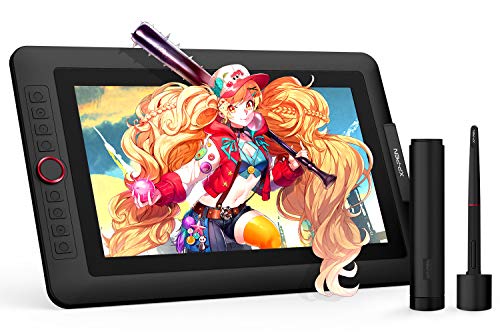
The XP-Pen Artist 13.3 Pro provides a full-laminated 13.3-inch display with excellent color accuracy (wide color gamut) and a generous viewing angle. It supports up to 60 degrees tilt, which helps create natural shading and brush effects without manual adjustments in software. The display yields vibrant colors and strong detail suitable for illustration, concept art, and design workflows. This model emphasizes color fidelity and a compact footprint for desktop setups or portable studios.
Key features include an advanced pen with high levels of pressure sensitivity and a robust color profile, plus a 3-in-1 cable setup for easy connections. The device is tailored for digital artists who want a high-quality screen experience in a more compact form factor compared to larger displays, while maintaining sharpness and depth in lines and textures.
TQU 8.5 Inch LCD Writing Tablet Pack

The 4-pack of 8.5-inch LCD doodle boards is designed for education and kids’ creativity, offering bright, high-contrast displays with pressure-sensitive drawing lines. Each board supports easy drawing and erasing with a front erase button and a lock switch to save content. While not a full-art tablet, these boards provide a practical, low-cost option for quick sketches, notes, and learning activities, making them ideal for classrooms or family use alongside more capable tablets.
Features emphasize portability and simplicity: a simple stylus tethered to the device, multiple color options via background board colors, and a durable build suitable for everyday play and practice in art fundamentals, handwriting, and basic design ideas.
Simbans PicassoTab X Drawing Tablet
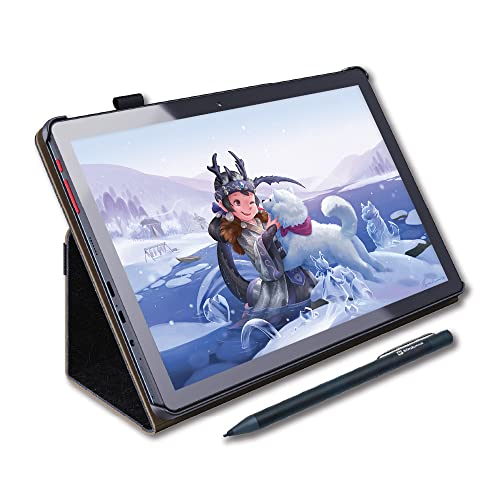
The PicassoTab X is a standalone 10-inch drawing tablet that runs drawing apps and tutorials directly on the device, eliminating the need for a separate computer. Its pre-installed apps and included accessories—such as a stylus, case, drawing glove, and power adaptor—create a ready-to-use setup for beginners and students. The box contents boost value by offering educational tools and a screen protector, enhancing durability and on-the-go creativity.
With a compact form factor and bundled educational software, the PicassoTab X appeals to users seeking a portable, self-contained drawing solution. The device supports basic art creation, note-taking, and light animation tasks, making it a practical starter option or a supplementary tablet for travel and classroom use.
HUION Inspiroy H640P Drawing Tablet

The Inspiroy H640P emphasizes portability and a compact footprint with 6 express keys and a battery-free stylus offering 8192 levels of pressure sensitivity. This tablet is suitable for beginners learning the basics of digital drawing, handwriting, and design work, as well as more experienced users who need a lightweight travel-ready device. The driver customization allows you to tailor shortcuts to your preferred software, improving your overall workflow while on the go or at a desk.
Its small size makes it ideal for laptops and smaller workspaces, yet it retains the essential features artists expect from larger models, including reliable pen accuracy, a textured drawing surface, and solid build quality. The H640P provides a balanced entry point for those who want a straightforward, affordable drawing tablet without extra display capabilities.
Buying Guide
- Display vs. standalone: If you need to see your work on-screen, prioritize pen displays like the Kamvas Pro 16 or XP-Pen Artist 13.3 Pro. If you’re content sketching or note-taking, standalones like PicassoTab X or simple LCD boards may suffice.
- Pen technology and pressure: Look for at least 8192 pressure levels and a battery-free or rechargeable stylus for consistent responsiveness and less maintenance.
- Color accuracy and gamut: Wide color gamuts (sRGB and Adobe RGB coverage) deliver richer, more accurate colors, especially important for illustration and concept art.
- Shortcut controls: Express keys and touch bars accelerate workflows. Consider models with customizable shortcuts that map to your most-used tools.
- Compatibility: Ensure support for your operating system (Windows, macOS, Linux, or Android) and your preferred software suite (Photoshop, Illustrator, Clip Studio Paint, etc.).
- Portability and size: Larger displays provide more drawing space but reduce portability. Choose a size that fits your desk and travel needs while maintaining comfortable drawing ergonomics.
- Price-to-performance balance: For beginners and hobbyists, prioritize essential features (quality pen, reliable driver, decent color, and a good drawing surface) over premium extras.